
Your needs, this model
Does it fit your priorities?
Would local QWERTY entry and Brother’s current listed TZe route meet your label routine?
The exact current U.S. ST1150DX page lists QWERTY and TZe through 12 mm. The older model-named guide instead specifies TZ/STZ; verify the cassette generation on a used machine rather than assuming both families work.
Explore this need in the finder →Is the older guide’s original TZ/STZ route enough, or do you need at least 18 mm TZ?
The guide lists STZ/TZ in 6, 9 and 12 mm widths. It does not reach an essential 18 mm original-TZ need.
Explore this need in the finder →Would you accept buying the optional AD-30 separately, or must AC power arrive in the box?
The guide says AD-30 is optional; the original DX brochure lists batteries, case and two cassettes rather than an AC adapter. An adapter-in-box requirement therefore remains unmet.
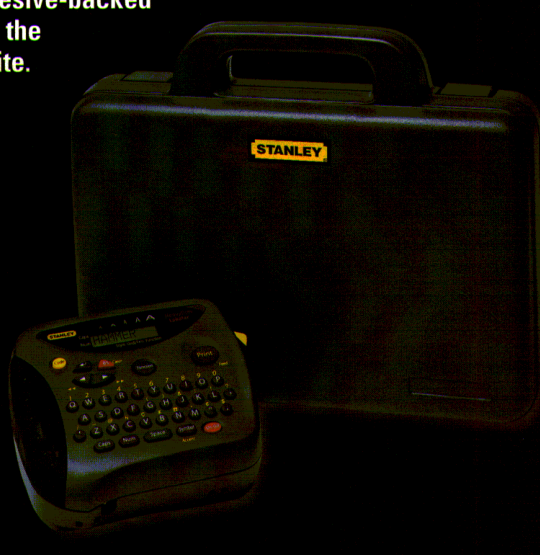
Explore this need in the finder →The discontinued Brother P-touch ST1150DX is best understood as a package variant of the Stanley Heavy Duty Labeler family, not as a faster or wider-printing step up. Brother’s exact DX brochure shows the ST-1150 machine alongside a carrying case. Its original box list adds the case and a second cassette to the six AAA batteries and tape already shown for the plain ST-1150. If those items are missing from a used unit, the “DX” marking alone does not recreate them.
The reason to choose DX is what travels with it
Brother’s current ST1150 and ST1150DX pages show the same core specification: QWERTY entry, laminated thermal-transfer media, a listed two-line limit and cassette widths through 12 mm. The model-specific guide is titled for ST-1150/1150DX, and Brother’s parts reference identifies the DX-specific carrying case and cassette pad. None of those sources describes a larger print engine, wireless connection or expanded width for the DX. Its practical advantage is a more complete original transport package—if that package has survived.
For field or workshop use, the hard case can keep the keyboard unit and loose cassette together between labeling sessions. That is a convenience claim about the package, not an independently verified protective rating. The illustrated case is not proof of impact resistance, water protection or a weather-sealed printer. Confirm the case latch, hinges and the exact cassette count on the offered unit rather than paying extra for a bundle whose defining pieces are absent.
Its label-making limits stay those of the ST-1150
This is an on-device keyboard workflow, not an app-connected maker. The shared user guide describes a one-row, eight-character display, with longer text entered and scrolled through; text can be up to 55 characters. Frames, styles, sizes and built-in symbols add some variety without requiring a phone. The two-line mode has an important condition: the guide says two lines require 9 mm or 12 mm tape, and a two-line label prints at the smallest text setting. If your label needs a particular printed height or a very narrow multi-line layout, ask for a sample or choose a model with a documented numeric output instead.
There is a genuine media-generation discrepancy worth taking seriously. Brother’s current DX product page lists TZe widths down to 3.5 mm, while the model-specific guide says use Stanley STZ or Brother TZ tape and lists 6, 9 and 12 mm. The common ceiling is 12 mm; the older guide does not validate the 3.5 mm claim. Verify the precise cassette code for the machine in hand before assuming a current cartridge will fit. The label is laminated, but neither the material nor a “Contractor Grade” brochure heading guarantees a bond on a dusty, oily or hot surface.
Portable power and package details
The guide specifies six AAA alkaline batteries and an optional Brother AD-30 adapter. Brother’s exact DX brochure says the original kit included six batteries and two tape cassettes, plus the carrying case and user guide. The AC adapter is not in that listed set; treat it as optional unless the seller proves otherwise. The same brochure gives the device dimensions as 6.1 × 5.1 × 2.5 inches and its weight as 0.9 pounds. Those are machine dimensions, not a measurement of the cased bundle, so allow extra space for the case and any cassettes.
The guide says a recent session can reappear when the unit is turned back on, but text and stored files are lost after power is disconnected for more than three minutes unless the adapter is connected. That is session retention, not a dependable archive for reusable designs. The page’s “Standard Memory 15” field has no unit, so I would not interpret it as fifteen label slots. The guide describes a hand-operated cutter lever; it does not establish automatic cutting. When checking a used DX, test power, keypad, tape feed and the cutter, and inspect the tape bay for a cassette or ribbon problem.
DX versus the plain ST1150
Choose a complete DX if the carrying case and second cassette are useful and present; choose the ordinary ST1150 if the machine is sold with the one-cassette package and the case has little value to you. Neither variant is the answer to a requirement for phone design or 18 mm tape. Brother’s current PT-D410 is a more sensible research starting point for 18 mm TZe labels, while a model with a documented app matters for phone-first design. These are alternatives by need, not claims that they share the DX’s package or print behavior.
As with the base machine, the DX suits someone who values a self-contained QWERTY labeler and already has a compatible tape route. It is a poor choice when you need guaranteed retail availability, an adapter in the box, more than 12 mm tape, a numeric print-height specification or a proven auto-cutter. Treat the DX suffix as a bundle cue, then inspect the actual items and machine identity; the discontinued brochure cannot guarantee the contents or condition of a current used offer.
Sources: Brother’s exact ST1150DX U.S. product page and ST-1150DX brochure; the Brother ST-1150/1150DX user guide (LA3255001), mirrored at ManualOwl, and Brother’s parts reference list.
Key details at a glance
| Print process | Thermal transfer |
|---|---|
| Maximum tape width | 12 mm |
| Compatible cassette | Brother’s exact current U.S. page lists TZe 3.5/6/9/12 mm; the Brother-authored ST-1150/1150DX guide (LA3255001, inspected through a third-party viewer) says use Stanley STZ/Brother TZ 6/9/12 mm only. The cassette generations and width tables are source-specific; only the shared 6/9/12 mm sizes and 12 mm ceiling agree. Choose an operating plan by the cassette actually accepted by the exact unit; do not infer blanket TZe/TZ interchangeability from a used listing. |
| On-device preview characters | 8 |
| Display type | LCD |
| Maximum lines per label | 2 |
| Line-count note | Both current exact product pages state a two-line maximum. The shared guide says two lines can be entered only with the older 9 mm or 12 mm tape, and then they print at Size 1 regardless of selected size. The sources do not resolve that rule for the current-page TZe configuration. |
| Body dimensions | Exact Brother brochure dimensions/weight refer to the machine itself, not the DX carrying case. |
| Tape cutting | The guide instructs the user to advance tape and push in the cutter lever. It does not document an auto-cutter. |
| Letter-key arrangement | qwerty |
| Original TZ maximum width | 12 mm |
Use the exact model’s instructions for operating limits, supplied equipment and version differences.
Sources for this assessment
- Brother Office & Home observed row ST1150DX at offset75/index79
- Exact Brother U.S. ST1150DX product page
- Exact Brother U.S. ST1150DX support page
- Exact Brother ST-1150DX U.S. brochure
- Brother ST-1150/1150DX User’s Guide LA3255001 (viewed through a secondary manual viewer)
- Brother indexed Parts Reference List for PT-1100/ST-1150 families
Put the device and its tape system together.
Match the exact model, cassette family, computer or network route and any optional power or touch-panel hardware before buying.