
Your needs, this model
Does it fit your priorities?
Do you want a built-in QWERTY keyboard for short D1 labels typed beside the item?
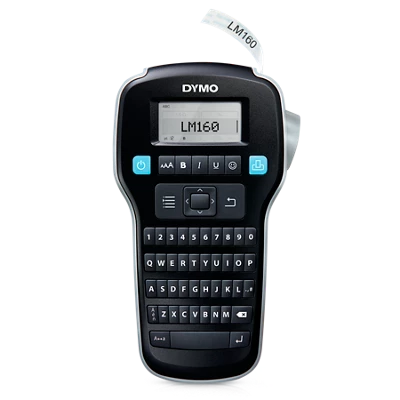
The model-specific guide drawing and the exact-page image show a QWERTY handheld. D1 tape up to 12 mm is documented; a phone app is not confirmed.
Explore this need in the finder →Will D1 9 or 12 mm tape give you the two-line labels you need?
The U.S. guide allows one line on 6 mm and up to two lines on 9 and 12 mm; it does not support a 19 mm D1 requirement.
Explore this need in the finder →Is rechargeable power essential for your exact LabelManager 160?
The current U.S. item page says rechargeable lithium-ion; the archived 2011 U.S. guide says six AAA cells and an optional adapter. Because the version bridge is unresolved, rechargeable power does not pass as an essential condition.
Explore this need in the finder →Do you need a confirmed USB computer-design route rather than the on-device keyboard?
The current page mentions PC/Mac connection but does not name USB or software; the archived guide documents on-device entry. Do not choose this model when USB is essential until the exact unit's route is verified.
Explore this need in the finder →The DYMO LabelManager 160 is a small, self-contained QWERTY label maker for D1 cassette tape. Its built-in keyboard is useful when you want to type beside the box, file or shelf being labeled, rather than compose a short name in a phone app. The important caution is version-specific power: DYMO’s current U.S. item 2175086 page describes a rechargeable lithium-ion design, while the archived 2011 U.S. LabelManager 160 guide describes six AAA alkaline cells and an optional 9-volt adapter. I cannot bridge that difference to a precise current hardware revision, so this is not a safe pick when rechargeable or replaceable-cell power is essential.
A direct keyboard workflow, not a screen-first printer
The guide’s model-specific front-panel drawing shows QWERTY rows, an LCD, navigation keys, formatting controls and a cutter button. That layout makes the 160 a sensible fit for occasional home or desk labeling: enter a short file name, bin description or cable note on the machine, preview it on the display, then print from the loaded cassette. The smaller screen and keypad are less comfortable for long wording or elaborate layouts than a computer editor. DYMO’s current page also mentions connecting to a PC or Mac, but does not identify the connection in its product details; the 2011 guide documents the handheld workflow, not a USB design path. Treat computer printing as unconfirmed for the exact version you are considering.
Choose D1 width around the line count
This model uses DYMO D1 cassettes, not Brother TZe or another maker’s tape. DYMO’s current U.S. listing names D1 Standard and Durable tape in 6, 9 and 12 mm widths, and the older guide agrees on the same three widths. The guide says 6 mm prints one line; 9 mm and 12 mm can print up to two. That is a practical range for short drawer, file and supply labels, but it is not a wide-format sign printer. A need for 19 mm or 24 mm D1 is outside the documented range, and two-line support does not establish a particular character height or legibility at a distance. The tape’s surface, adhesive type and surroundings still matter: select Standard or Durable from the actual label job and the cassette’s instructions, rather than treating the tape family as a guarantee for every surface.
Do not buy on an assumed battery or connection
The two primary sources describe materially different power arrangements. The 2011 U.S. guide says six AAA alkaline batteries run the label maker and describes an optional 9 V, 2 A adapter. The current DYMO U.S. page for item 2175086 instead calls the product rechargeable and lithium-ion powered. Neither source explains whether the current item is a revised version, whether the old guide applies to that exact revision, or which power accessories come with the current package. Check the model and item markings on the device and the current in-box documentation before buying or stocking batteries. Until that bridge is verified, the finder deliberately does not count the 160 as either rechargeable or replaceable-battery powered; if one of those is a must-have, compare another model with a consistent exact-version record.
There is a smaller specification conflict as well: the current page’s description says 15 mm per second, while its feature list says 12 mm per second. I do not use either figure as a speed promise. The same page showed the exact item out of stock on October 25, 2026, so a search result is not proof that a particular unit or package is available. DYMO also mentions a PC/Mac connection without naming a port or software route on the page. If computer-created layouts, USB, a phone app or a specific transfer method is essential, do not infer it from the general phrase “connect to your PC/Mac.”
Simple finishing has limits
The archived guide describes pressing the cutter button after printing, so plan on a user-operated cut rather than automatic finishing. It also documents an automatic shutoff after two minutes and says label text and formatting are lost if both batteries and the optional adapter are disconnected. That is convenient for an interrupted short task while power remains connected, but it is not a substitute for keeping important wording elsewhere. The 160 is monochrome label output; colored cassette stock is not full-color printing. It is also not the right fit when the job requires automatic batch cutting, a wider D1 cassette, or a confirmed computer/mobile production path.
Who should consider it—and what to compare
Consider the LabelManager 160 when the confirmed requirements are a local QWERTY keyboard, D1 tape up to 12 mm and occasional one- or two-line text. Its practical distinction is typing at the labeler itself; the D1 9/12 mm options add a second line without moving to a wide desktop machine. Skip it if you need a known battery type, reliable current stock, a documented USB or app workflow, wider signage, full-color output or automatic cutting. The LabelManager 280 is a separate comparison if you want a better-documented rechargeable-and-computer-oriented D1 workflow; it is not proof that the 160 has those features. For any used unit, verify the model/item label, test the keypad and cutter, inspect the cassette code and power compartment, and confirm that the selected D1 width and power arrangement suit the task.
Sources: DYMO’s U.S. LabelManager 160 page, item 2175086, and the DYMO LabelManager 160 U.S. User Guide.
Key details at a glance
| Full-color output | No |
|---|---|
| Print process | thermal transfer monochrome |
| Maximum tape width | 12 mm |
| Compatible cassette | DYMO lists D1 Standard and Durable tape at 6, 9 and 12 mm. Do not treat it as Brother TZe or infer wider media. |
| Display type | LCD display |
| Maximum lines per label | 2 |
| Line-count note | The archived U.S. guide allows one line on 6 mm and up to two on 9 or 12 mm tape. |
| Power choices | The current U.S. page describes rechargeable lithium-ion power; the archived 2011 U.S. guide describes six AAA cells and an optional adapter. Exact current-version power remains unknown. |
| Tape cutting | The U.S. guide describes pressing a cutter button after printing; automatic cutting is not documented. |
| Letter-key arrangement | qwerty |
Use the exact model’s instructions for operating limits, supplied equipment and version differences.
Sources for this assessment
Put the device and its tape system together.
Match the exact model, cassette family, computer or network route and any optional power or touch-panel hardware before buying.