
Your needs, this model
Does it fit your priorities?
Do you want a built-in QWERTY keyboard for typing short labels at the machine?
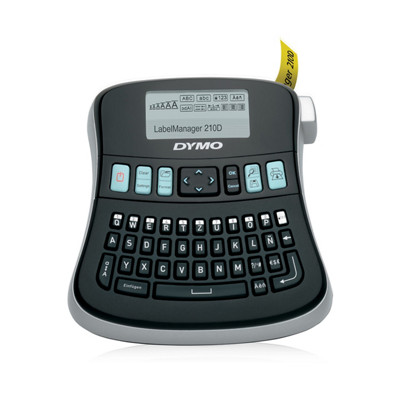
The exact 210D page and U.S. user guide document a QWERTY layout and a large graphical display. The documented workflow is on-device entry.
Explore this need in the finder →Will DYMO D1 cassettes up to 12 mm work for your labels, including two lines on 9 or 12 mm?
The U.S. guide documents D1 6/9/12 mm cassettes; the U.S. product sheet states two-line output is for 9 mm and 12 mm.
Explore this need in the finder →Is a rechargeable battery essential?
The exact guide specifies six AA alkaline cells and a power adapter; it does not document rechargeable-cell support.
Explore this need in the finder →Do you need AC-adapter operation, or must an adapter be included in the kit?
The exact user guide specifies a compatible 9 V, 1.5 A adapter; the current U.S. kit page lists an AC adapter in the box.
Explore this need in the finder →Must the cutter operate automatically after printing?
The exact U.S. user guide instructs users to press the cutter after printing; automatic cutting is not documented.
Explore this need in the finder →Is computer-by-USB label design essential?
The exact 210D page and U.S. guide do not establish a computer/USB design path for this configuration.
Explore this need in the finder →The DYMO LabelManager 210D is a desk-oriented, QWERTY label maker for people who want to type and format a short label on the machine rather than compose it on a phone or computer. The exact U.S. product page identifies the 210D kit as item 1738976, but the product is currently shown out of stock. The core model is identifiable; the exact cassette bundle is less certain because DYMO’s current page gives conflicting descriptions of one included yellow cassette, and an older U.S. product sheet describes a different 210D kit pack. Treat the model and the box contents as separate questions.
Why choose a desktop layout?
The 210D’s QWERTY keyboard and large graphical display make text entry feel closer to using a small office keyboard than a phone keypad. Its screen previews formatting before you print, while dedicated quick-access controls help with punctuation and currency symbols. That is useful when you repeat practical labels for folders, binders, storage bins or desk supplies. The U.S. user guide also documents nine saved label memories and printing up to ten copies in a job. Those features make it more convenient for repeated short runs than a basic handheld with no documented memory workflow.
It is still an on-device label maker, not a full desktop design system. The page and user guide establish local keyboard entry, not a phone app or a computer-connected layout workflow. If you need a PC template, barcode workflow, or a phone-first design process, do not infer that capability from the words “computer-style keyboard.” Ask for a specifically documented connection and software path before making it essential.
Pick tape width before you plan the label
The exact U.S. guide and product sheet identify DYMO D1 cassettes in 6, 9 and 12 mm widths. The guide limits the machine to two lines; DYMO’s U.S. product sheet specifies that two-line printing is available on 9 mm and 12 mm, not the narrow 6 mm option. For a tiny file tab, 6 mm keeps the strip narrow but is a one-line choice. For a folder name with a second line, choose 9 or 12 mm. The 12 mm maximum is a real limitation if you need wider shelving, shipping or large-format signs.
The current U.S. product page lists D1 Standard and Durable tapes. That makes the 210D a fit for ordinary adhesive labels, not a general-purpose color printer or an industrial system whose separate media families are interchangeable. Choose D1 by width, color and the surface you will label; do not assume a label maker will make lettering, print on heat-shrink tubing, or handle a larger cassette simply because another model in a brand family does.
Power, cutting and kit caveats
The model-specific user guide specifies six AA alkaline batteries and an optional 9-volt, 1.5-amp adapter. The current item 1738976 page says the kit includes six AA batteries and an AC adapter, so the power route is more fully documented here than on a bare-machine listing. The guide describes pressing the cutter after a print; it does not support an automatic-cut requirement. The manual cutter is practical for occasional office work, but it is another deliberate step when you are making many separate labels.
Check the seller’s exact item number and current package list before paying. DYMO’s present product page describes two starter tapes, but the yellow cassette’s length differs between its feature text and included-parts list. The U.S. product sheet identifies the same 1738976 kit with a different yellow-cassette width and also lists a carrying case. Those are real source conflicts, not proof that every old kit or current box contains the same accessories. The 210D’s D1 compatibility is clear; the particular tapes and case in a given kit are not.
Who should keep it on the shortlist?
Consider the 210D if your priority is a familiar QWERTY layout, a larger preview display, saved short labels and repeat copies on D1 tape no wider than 12 mm. It is less compelling if you want rechargeable power, automatic cutting, wider media, or a verified PC or phone workflow; those are either unsupported by the documented configuration or not established by its sources. If a smaller handheld is more important than memory and desk ergonomics, compare the LabelManager 160, but verify its exact revision and power claims separately. If the 210D kit appears in a resale listing, match the model number and inspect the actual cassette inventory rather than assuming a listing photograph proves what is in the box.
DYMO U.S. LabelManager 210D kit page · DYMO LabelManager 210D U.S. User Guide · DYMO U.S. 210D product sheet
Key details at a glance
| Full-color output | No |
|---|---|
| Maximum tape width | 12 mm |
| Compatible cassette | The exact model guide and U.S. sheet name D1 widths 6, 9 and 12 mm. Do not infer media wider than 12 mm or a different cassette family. |
| Display type | large graphical display |
| Maximum lines per label | 2 |
| Line-count note | Two lines are documented for 9 mm and 12 mm tape; the 6 mm option is not a two-line width. |
| Letter-key arrangement | qwerty |
Use the exact model’s instructions for operating limits, supplied equipment and version differences.
Sources for this assessment
Put the device and its tape system together.
Match the exact model, cassette family, computer or network route and any optional power or touch-panel hardware before buying.