
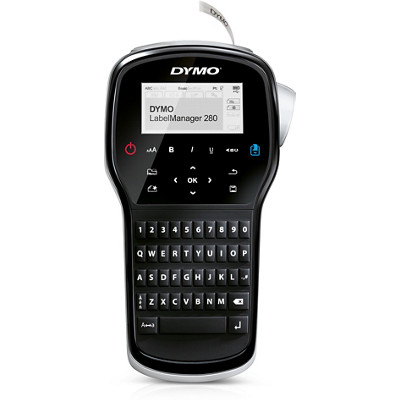
Your needs, this model
Does it fit your priorities?
Do you want QWERTY entry for small D1 labels, without needing a phone app?
The LabelManager 280 has a QWERTY keypad and standalone entry, plus computer USB; a phone-app route is not confirmed.
Explore this need in the finder →Do your everyday labels fit D1 9 or 12 mm with no more than two lines?
The 280 supports up to two lines on 9 and 12 mm D1; 6 mm is single-line only. It does not satisfy a 19 mm or wider requirement.
Explore this need in the finder →Would you like a USB computer route and a rechargeable battery in one handheld?
The guide documents USB printing from a computer and DYMO documents the rechargeable Li-ion pack. Adapter-in-box status is unresolved, so this answer does not require an adapter.
Explore this need in the finder →The DYMO LabelManager 280 is a rechargeable handheld for someone who wants to type directly on a familiar QWERTY keyboard, but still wants the option of designing labels from a computer. It uses DYMO D1 tape in widths up to 12 mm. Its strengths are straightforward on-device entry and a battery-powered format; its limits are a two-line ceiling and a package detail that the current U.S. product page and the older guide describe differently.
A physical keyboard, with a computer route when it helps
The 280 does not make a phone app the center of the experience. You can type on its built-in QWERTY keypad and work from the display, or connect it over USB to a Windows or Mac computer for software-designed labels. That split suits someone who labels storage bins at home but occasionally needs to place a logo or more carefully formatted text on a label. It is less appealing if your essential requirement is composing from a phone: neither the current product listing nor the guide I checked establishes a mobile-app or Bluetooth workflow.
The keyboard layout matters more than a headline such as “portable.” QWERTY is familiar to many typists, and the exact-model front image shows that layout. The machine can also print standalone, so a computer is not required for ordinary text. DYMO’s current listing identifies the DCD desktop software and lists current download routes for Windows and Mac, but always check support for the computer you intend to use before buying an older model.
D1 widths set the actual label job
This is a D1-cassette machine, not a Brother TZe printer. The 280 supports D1 Standard and Durable cassettes at 6, 9 and 12 mm. The guide allows at most two lines on a label, with only one line on the narrow 6 mm cassette. That makes the 9 or 12 mm options the practical starting point for a name plus a second line; the wider 12 mm format also gives more room than the slim 6 mm strip. Do not treat the 12 mm tape as evidence of a large-format label: DYMO’s 420P reaches 19 mm, and the Executive 640 CB reaches 24 mm.
Matching the width to the task is important because the question “can it print two lines?” has a different answer from “can it print two lines on the cassette I plan to buy?” Here the manual is explicit: two lines are possible on 9 and 12 mm, but not 6 mm. The tape is continuous self-adhesive cassette stock, so you choose the tape color and cut each printed label after printing. If you need full-color graphics, heat-shrink tubing, or a fixed-size die-cut label, this is the wrong kind of machine.
Rechargeable, but check the charger in the box
The 280 uses an included rechargeable lithium-ion battery pack and the guide says it turns off after two minutes of inactivity. A USB cable is listed with the machine and supports its computer route. An AC charging adapter is a separate question: the current product page’s “Included Parts” list names the battery, cable, cassette and guides, but no adapter. The guide says an adapter is included and identifies one for charging; it also says that adapter cannot power the label maker. Because those package lists disagree, I would not count on an adapter being in a newly sold box without checking the exact offer.
The guide describes about three hours for a full recharge and says the machine can print after roughly ten minutes of charging. Those are manufacturer instructions, not a promise about the condition of an older battery. If you are considering a used 280, battery age and capacity matter more than the original advertised convenience. Its physical cutter is operated by the user; there is no confirmed automatic-cut workflow here.
Best for short organized runs, not the widest jobs
The guide documents memory for up to nine frequently used labels and printing up to ten copies at a time. That is useful for repeated household or office labels without turning the 280 into a batch-production machine. The listed print speed is 15 mm per second, but that number does not say how quickly an individual user can format, feed and apply labels. There is no reason to assume a specific service life or label adhesion on every surface.
Compared with the DYMO LabelManager 420P, the 280 trades the 420P’s 19 mm tape, four-line output and barcode support for a QWERTY keypad and a smaller maximum cassette width. The 420P’s alphabetical letter layout will feel different to a QWERTY typist. The Executive 640 CB keeps the QWERTY layout but adds Bluetooth app design and D1 widths through 24 mm; its USB data path is not established, so do not choose it for a computer-USB requirement. All three use D1, which is not interchangeable with Brother TZe.
At the October 25, 2026 check, DYMO’s U.S. page showed the 280 out of stock rather than marking it discontinued. Stock can change. Before ordering, compare the exact model and item number 1815990, confirm the included cassette and charger, and make sure the D1 widths fit your actual labels. See DYMO’s LabelManager 280 page and the 280 user guide for current package and operating details.
Key details at a glance
| Full-color output | No |
|---|---|
| Print process | thermal transfer monochrome |
| Maximum tape width | 12 mm |
| Compatible cassette | DYMO D1 Standard and Durable cassettes in 6, 9 or 12 mm. D1 is not Brother TZe. |
| Display type | graphical LCD |
| Maximum lines per label | 2 |
| Line-count note | Width-specific: 6 mm supports one line; 9 and 12 mm support up to two lines. |
| Saved label files | 9 |
| Power choices | Rechargeable Li-ion pack is included. The manual describes an adapter for charging only and says the adapter cannot power the machine; the current page's package list omits the adapter, while the manual says one is included. |
| Body dimensions | DYMO lists 7.5 × 3.51 × 9.5 inches without axis labels; no width or height is assigned for fit filtering. |
| Tape cutting | The guide shows the user pressing a cutter button after printing; automatic cutting is not documented. |
| What the base package supplies | Current page lists the maker, rechargeable pack, USB cable, black-on-white D1 starter cassette (12 mm × 10 ft), quick-start card and reference guide. The separate adapter inclusion conflicts with the user guide and remains unknown. |
| Letter-key arrangement | qwerty |
Use the exact model’s instructions for operating limits, supplied equipment and version differences.
Sources for this assessment
Put the device and its tape system together.
Match the exact model, cassette family, computer or network route and any optional power or touch-panel hardware before buying.