
Your needs, this model
Does it fit your priorities?
Do you need four lines or a barcode on a wider D1 label?
The 420P supports up to four text lines on 19 mm D1 tape. Barcodes also require 19 mm, but cannot be combined with multi-line, vertical or mirror formatting.
Explore this need in the finder →Do you design on a computer and need rechargeable operation?
The 420P manual documents computer printing over USB and a rechargeable Li-ion battery; the included adapter is a charger, not a direct AC power supply.
Explore this need in the finder →Would you use the 19 mm barcode route rather than QWERTY on-device typing?
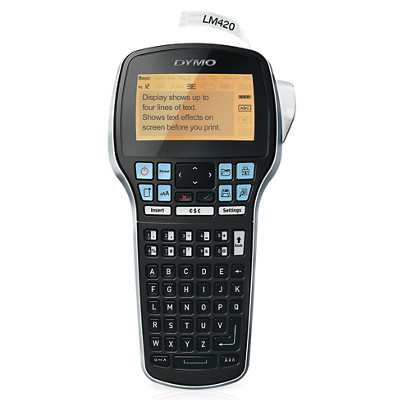
It can create the documented barcode types on 19 mm D1 tape. The exact image shows alphabetically arranged keys, and the guide says barcodes are single-line only.
Explore this need in the finder →The DYMO LabelManager 420P is the D1 handheld to consider when the job needs computer-designed labels, a four-line display, or barcode creation on 19 mm tape. It also works standalone and runs from a rechargeable pack. Its alphabetical letter keys are a meaningful tradeoff for anyone who expects a QWERTY keyboard, and its barcode and line-count capabilities are tied to the wider D1 cassette rather than available on every tape width.
Use the wider tape for the wider work
The 420P accepts D1 Standard and Durable tape in 6, 9, 12 and 19 mm widths. The user guide sets a width-specific ceiling: one line at 6 mm, two at 9 mm, three at 12 mm and four at 19 mm. The four-line backlit screen is therefore not a promise that every cassette can print four lines. If a four-line label is essential, the 19 mm D1 plan is the one to match; a 12 mm cassette stops at three.
The same 19 mm limitation matters for barcodes. DYMO lists UPC-E, Code 39, Code 128, EAN-13, EAN-8 and UPC-A support, and the guide says barcodes can only print on 19 mm labels. It also says not to use a barcode on a multi-line label or with vertical or mirrored formatting. That makes the 420P useful for a barcode-led label or a four-line text label, but not both in one multi-line layout. A buyer who only needs narrow file tabs may not benefit from the extra cassette width or barcode menu.
The label maker prints through a manual cutter button, not a documented automatic-cut route. After printing, the user cuts and peels the backing. A physical cutter is straightforward for short runs, but this is not a “print a long sequence and have each label automatically separated” machine.
Computer design and on-device entry are separate strengths
You can enter text on the machine or connect it to a Windows or Mac computer over USB. The 2018 user guide describes standalone operation and computer printing through its built-in software or DYMO Label v.8. DYMO’s current U.S. product listing identifies DYMO Connect for Desktop compatibility and offers current Windows and macOS downloads. This gives you a fuller layout path than a small screen alone, but compatibility should still be checked against the computer and software version you actually use.
On the device itself, the letter keys are arranged alphabetically rather than in QWERTY order. That may work well if you prefer alphabetic key order, but someone who touches types will have a learning curve. The machine includes a rechargeable lithium-ion battery pack and charging adapter. The guide is clear that the adapter recharges the battery and cannot power the printer directly. That is a charger-included package, not an AC-only desktop route. The guide also says automatic power-off follows ten minutes of inactivity.
Two source conflicts are worth keeping visible
DYMO’s current product page says the 420P stores up to 15 frequently used labels. The available user guide says up to nine. I leave the saved-label count unresolved rather than assuming that the newer page or older guide applies to every software or hardware revision. If stored templates are central to your routine, check the exact unit and package before relying on a count.
The current product page lists an included D1 black-on-white 19 mm starter cassette, rechargeable battery pack, charging adapter, USB cable and one-year limited warranty card. That is a useful starting point for evaluating a specific offer, but the page showed the machine out of stock when checked on October 25, 2026. The item is still listed by DYMO and is not marked discontinued; stock status is not a performance attribute and can change.
Where it sits beside the 280 and Executive 640 CB
The LabelManager 280 is the closer fit if QWERTY entry and a 12 mm ceiling cover the job. It also supports computer USB, but only documents two lines at most and has no confirmed barcode support. The 420P instead supports 19 mm, up to four lines on that width, and barcode creation; its alphabetic keyboard differs. The Executive 640 CB is another rechargeable D1 option with QWERTY entry and a phone-app route, and its guide covers tape up to 24 mm and five lines at that width. The 640 CB’s USB data workflow remains uncertain, so the 420P is the better-supported choice when a computer connection is essential.
None of these DYMO models uses Brother TZe. If your existing cassettes are TZe, the 420P will not reuse them. For a new purchase, compare exact D1 cassette sizes and current software support, then verify the 420P item number 1768815 and package contents. See DYMO’s LabelManager 420P page and its user guide before relying on barcode, width or saved-label limits.
Key details at a glance
| Full-color output | No |
|---|---|
| Print process | thermal transfer monochrome |
| Maximum tape width | 19 mm |
| Compatible cassette | DYMO D1 Standard and Durable cassettes in 6, 9, 12 or 19 mm. D1 is not Brother TZe. |
| Display type | four-line backlit graphical LCD |
| Maximum lines per label | 4 |
| Line-count note | Width-specific: 6 mm one line; 9 mm two; 12 mm three; 19 mm four. The four-line maximum is not available on narrower D1 tape. |
| Power choices | Rechargeable Li-ion pack and charging adapter are included. The guide says the adapter charges the battery but cannot directly power the label maker. |
| Body dimensions | DYMO lists 7.362 × 3.937 × 9.843 inches without axis labels; no width or height is assigned for fit filtering. |
| Tape cutting | The user presses a cutter button after printing; automatic cutting is not documented. |
| What the base package supplies | Exact U.S. page lists a black-on-white D1 19 mm × 10 ft starter cassette, rechargeable battery pack, charging adapter, USB cable, quick-start guide and one-year limited warranty card. |
| Letter-key arrangement | alphabetical |
Use the exact model’s instructions for operating limits, supplied equipment and version differences.
Sources for this assessment
Put the device and its tape system together.
Match the exact model, cassette family, computer or network route and any optional power or touch-panel hardware before buying.