
On this page
Your needs, this model
Does it fit your priorities?
Do you want to compose labels on a built-in keyboard, a computer, or both?
The LW-K740PX documents a built-in QWERTY keyboard and a USB desktop-software route on the same printer. Its product page does not establish a phone-app workflow.
Explore this need in the finder →Is Epson LabelWorks PX media essential, and do you need its 24 mm width?
The exact model supports Epson PX cassette supplies through 24 mm. Width is not the same as printable width; Epson lists an 18.1 mm printhead. A TZe, D1 or LK cassette is not an interchangeable substitute.
Explore this need in the finder →Must every strip be cut automatically, or is a hand lever essential?
Epson specifies an automatic cutter. A separate manual cutter is not established for this model, so an essential manual-lever condition should not be matched.
Explore this need in the finder →Would an included AC adapter work, or is a rechargeable battery pack essential?
The exact kit includes an AC adapter; the setup guide also describes six replaceable AA cells and says the printer does not charge NiMH cells. No internal rechargeable pack is documented.
Explore this need in the finder →Epson LabelWorks LW-K740PX review
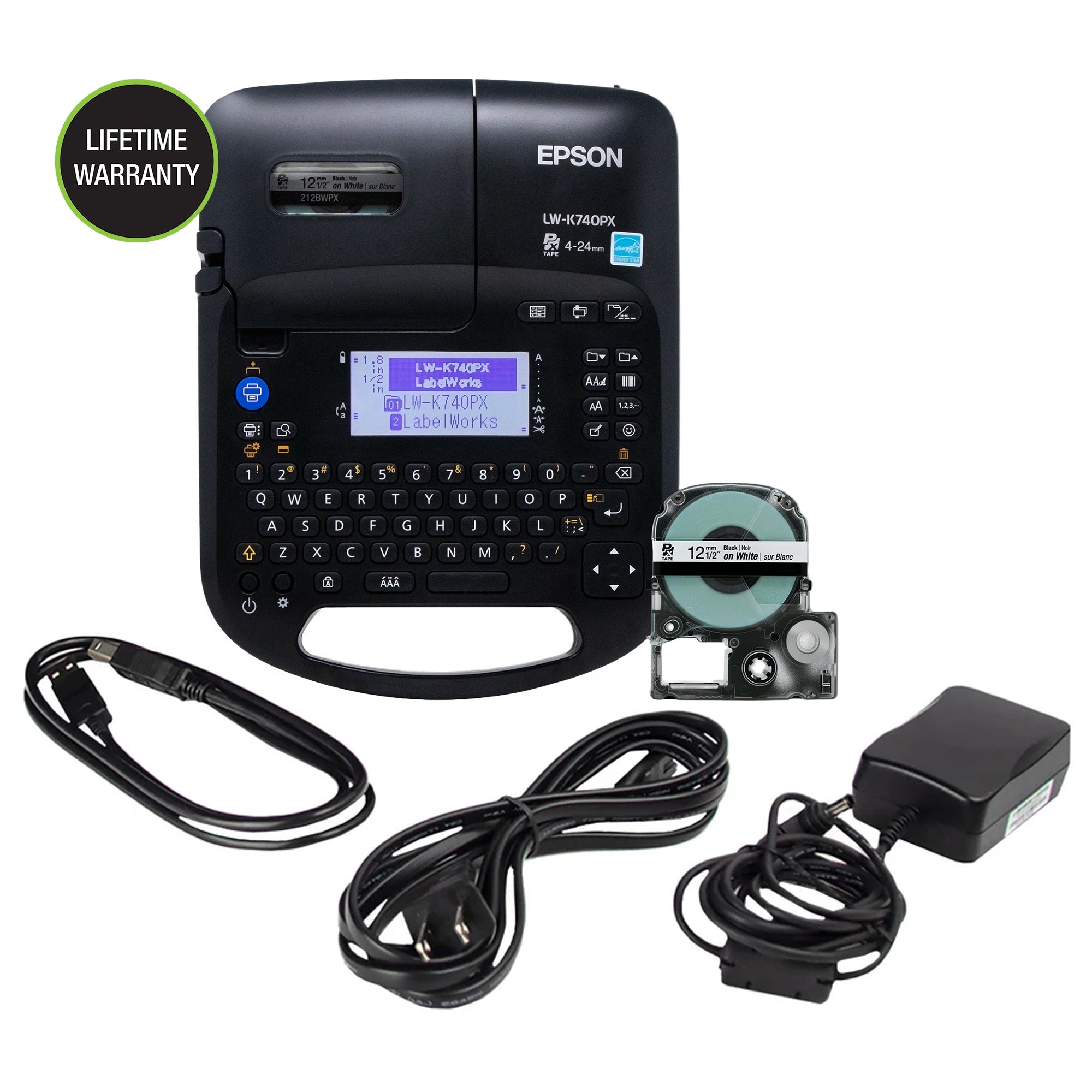
The Epson LabelWorks LW-K740PX is a keyboard-equipped thermal-transfer label printer for a routine that may start at the machine or at a computer. Its main distinction is not a phone app or a color-photo system: it offers built-in QWERTY entry, a backlit monochrome display and a USB software route, while using Epson LabelWorks PX supplies up to 24 mm wide. That combination can suit a small workshop, office or home that wants direct entry for short labels but sometimes needs a computer-made design.
Two composing paths, but not a pocket-sized labeler
The built-in keyboard is useful when a person needs to type an equipment name, shelf code or cable identifier without opening a separate device. The screen is backlit and monochrome. For a longer layout, Epson lists a USB cable and desktop Label Editor software; its current downloads page includes the K740PX among supported printers for Windows and Mac versions. The newer Windows release changes the older operating-system and ARM notes shown in the product page's specification table, so a business buying for an existing computer should verify the current download and host compatibility before standardizing a fleet. Mac use is a desktop-software route, not evidence of phone-app or wireless support.
There is a useful distinction between the printer and its software. The product page's printer specification says “Data Import: No,” while Epson's current software material promotes spreadsheet batch printing. Treat that as a computer-software workflow, not as a promise that the labeler itself imports a database or holds print jobs for unattended batch output. If label design must happen on a phone, this is not a confirmed match: the sources reviewed document the keyboard and USB computer route, not a K740 phone app.
Choose the cassette system before choosing colors
The K740PX prints on LabelWorks PX cassette media in widths of 4, 6, 9, 12, 18 and 24 mm. Epson advertises heat-shrink tubing, magnetic tape and strong-adhesive options alongside ordinary label supplies. Its exact FAQ warns that the separate LabelWorks LK cartridge system is not interchangeable with PX; matching the word “LabelWorks” on a box is not enough. The PX product family itself covers several materials and imprint colors, but the K740 is a thermal-transfer cassette printer, not a full-color photo printer. Someone who needs a particular material should confirm its tape SKU and width against the printer and intended surface rather than infer suitability from the material name.
“24 mm tape” is also not the same thing as a 24 mm-wide printed image: Epson lists an 18.1 mm printhead. Its specification page gives a minimum 10 mm lead margin for standard industrial tape and says specialty media varies. The tape-saving design can reduce waste compared with larger default margins, but it does not promise a zero-margin first label. For many tiny labels or long unbroken batches, that difference affects how much of a cassette is consumed.
Useful production features and their limits
The manufacturer lists an automatic cutter, cable-wrap and flag formats, barcodes, QR codes, and 14 fonts. That makes it more than a plain one-line text imager, particularly where one labeler has to switch between identifiers and basic organization labels. Epson rates the maximum print speed at 13 mm per second with the AC adapter, and gives 180 dpi resolution. Those specifications describe a small label tool, not a high-throughput shipping printer. The product page also lists internal storage for up to 100 files; do not confuse this saved-file capacity with the separate question of importing a spreadsheet from computer software.
The exact setup guide lists approximate dimensions of 184 × 238 × 79 mm and a weight of about 755 g before tape and batteries. This is portable in the sense that it can be moved between work areas, but it is a sizeable handheld-keyboard format rather than a pocket labeler. For repeated use, the included AC adapter avoids replacing cells. The guide also documents six AA alkaline or nickel-metal-hydride batteries; the printer does not charge rechargeable cells, so those must be charged separately. The manufacturer’s exact kit list names the printer, a 1/2-inch black-on-white cassette, Label Editor software, adapter, USB cable and guide. A secondhand listing may not include that original bundle, so check the actual accessories rather than rely on the factory configuration.
Who should choose it—and who should look elsewhere
Choose the LW-K740PX if built-in QWERTY entry and a USB computer option are both useful, automatic cutting matters, and Epson PX media up to 24 mm matches the labeling job. It is also a plausible fit for a mixed routine where standard tapes sit alongside selected heat-shrink or magnetic supplies. The questionnaire should favor it for local keyboard, USB computer design, automatic cutting and an essential PX-width requirement. It should not pass a TZe or DYMO D1 cassette requirement, a serial-only connection, full-color output, an essential rechargeable battery pack or a manual-cut-only condition; those are different capabilities or remain unconfirmed.
If a phone app is the deciding workflow, compare the reviewed DYMO LabelManager Executive 640 CB Box, which uses a separate D1 cassette system and has a documented mobile-app path. If full-color label artwork is essential, the Brother VC-500W uses a different ZINK roll system and should be compared on media cost and layout rather than treated as a PX alternative. The K740PX's own fit is narrower and clearer: a mid-size keyboard labeler that bridges local typing and computer composition, with a manufacturer-specific supply family and an automatic cutter.
Key details at a glance
| Full-color output | No |
|---|---|
| Print process | Thermal transfer |
| Maximum tape width | 24 mm |
| Compatible cassette | Epson’s product page and linked guide establish PX cassette media up to 24 mm; the official FAQ says the separate LK cartridge family is not interchangeable. Do not infer that every PX supply material is suitable for every surface or environment. |
| Computer design route | Epson Label Editor for Windows and Mac; use current downloads page because OS/version notes have changed. |
| Body dimensions | Approximate W × D × H from the Epson guide: 184 × 238 × 79 mm. Inch values are unit conversions of that manufacturer measurement. |
More specifications and setup details
| Letter-key arrangement | qwerty |
|---|
Use the exact model’s instructions for operating limits, supplied equipment and version differences.
Sources for this assessment
- Official Epson LabelWorks all-printers listing, page 2; LW-K740PX row
- Epson LabelWorks exact LW-K740PX product page
- Epson LabelWorks Product Brochures & Manuals page
- Epson LW-K740PX linked English guide PDF
- Epson LabelWorks current software downloads
- Epson LabelWorks official FAQ, PX/LK tape compatibility
- Epson exact model product-page image

Put the device and its tape system together.
Match the exact model, cassette family, computer or network route and any optional power or touch-panel hardware before buying.