
On this page
Your needs, this model
Does it fit your priorities?
Will a local keyboard and the included dedicated adapter match your stationary work setup?
Yes. This exact offer includes the adapter while retaining the PX300’s built-in QWERTY keyboard and 18 mm PX cassette workflow.
Explore this need in the finder →Do your jobs need the package adapter but not an included carry case?
The LW-PX300ADPT box lists the adapter but not the industrial case or rubber guard, unlike the VP full kit.
Explore this need in the finder →Does 18 mm PX tape and the dedicated cable-flag mode cover your field labels?
The shared guide documents cable-wrap and cable-flag workflows on this PX300 body, with 6–18 mm supplies. A 24 mm minimum is not supported.
Explore this need in the finder →Does a person-operated cut button fit your finish routine, with no need for an automatic full cut?
Yes for hand-operated finishing: the guide says to wait for the tape to stop and press the Cut Button. It is a button, not a lever, and the model does not cut automatically.
Explore this need in the finder →Epson LabelWorks LW-PX300 with Adapter review
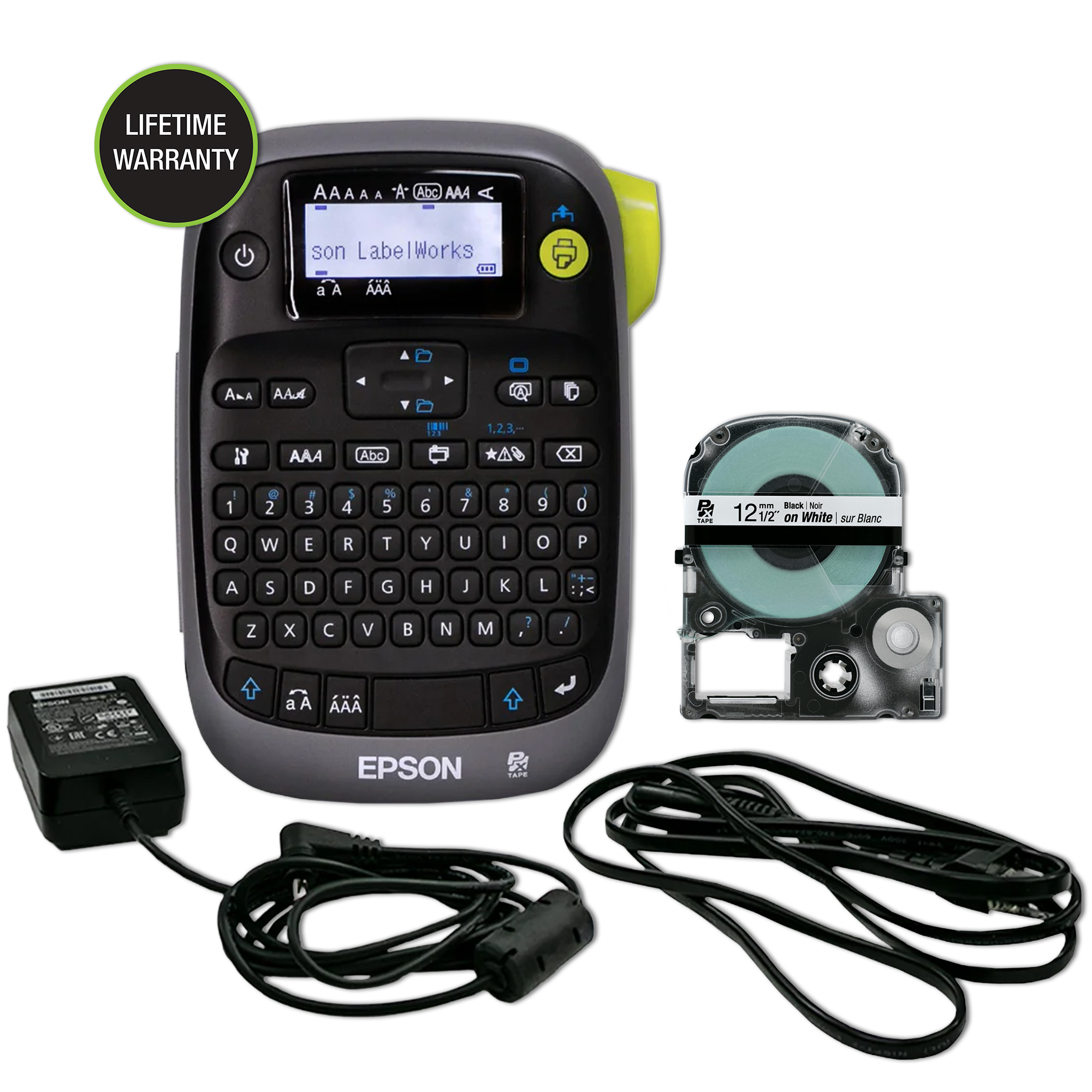
LW-PX300ADPT is a distinct Epson package for shoppers who want the compact PX300 printer and a dedicated power supply in the box, but do not need the full industrial carry case and bumper guard. Epson’s exact SKU page lists the LW-PX300, 12 mm black-on-white PX tape cartridge, AC adapter and owner’s manual. It does not list the case or guard. The printer’s keyboard, display, supported cassette widths and label functions are those of the standard PX300, so the key decision is package readiness rather than a different engine.
Choose it for local text entry with outlet power ready
The PX300 is unusual among compact industrial labelers because it is built around an on-device QWERTY keyboard. Type a short equipment, bin or cable label directly on the machine, review the text and length on its 130 × 48 back-lit monochrome LCD, then print. No computer data import is documented, and the LCD does not show the full print image. That keeps the workflow straightforward for one-off field labels but makes this a poor fit for someone who needs app design, spreadsheet jobs or a preview of complex artwork.
In the ADPT package, the supplied adapter means you can use the dedicated AC route at a workbench without finding the optional accessory later. The manual identifies the correct adapter as APT0615Z2-1 and cautions against using a different power supply. The printer can also run from six AA alkaline cells; Epson does not include those cells. This is flexibility between outlet and disposable-cell use, not a rechargeable battery system. If you expect to carry the printer with accessories protected together, the LW-PX300VP is the version whose listed contents include the industrial case and rubber guard. If you need neither a supplied adapter nor case, the plain LW-PX300 is the separate package.
Know the PX tape limits before you stock supplies
Epson’s product page supports LabelWorks PX cassettes in 6, 9, 12 and 18 mm widths. The printer uses thermal transfer, with a stated 180 dpi resolution, 9.1 mm printhead and maximum speed of 6 mm per second when powered by its adapter. These are manufacturer specifications, not independent speed or legibility tests. Tape width is not the printable character height, and the manual does not state an exact maximum print height. The PX cassette family is proprietary to this Epson workflow; Brother TZe and DYMO D1 cartridges do not become compatible because they happen to share a width.
The starter is a 12 mm black-on-white cassette. Epson says the image may show vinyl stock but reserves the right to substitute an equivalent standard polyester cassette. PX supplies include several colors and industrial materials, and the guide lists compatible magnetic, high-adhesion, vinyl and silver-matte options as well as two heat-shrink tube sizes. However, colored tape is still monochrome thermal-transfer printing. This is not a full-color image maker, and it cannot print QR codes. Eight barcode types are built in; Epson advises checking output with a barcode reader rather than assuming every code prints and scans correctly.
Technical layouts and a manual cut button
The PX300 supports on-device cable-wrap and cable-flag formatting, three folder-tab sizes and a ribbon mode. The manual also describes printing on 3 mm or 5 mm PX heat-shrink tube, with the separate heat gun and appropriate tube part selected for the wire. Those guided forms make the modest-width printer more specialized than a plain household organizer, but the 18 mm ceiling should be compared with the broader PX700 and PX800 if you need a larger work label.
Finishing is manual. Epson calls the cutter manual and instructs the user to wait for printing to stop, then press the Cut Button. No automatic full-cut function is listed. For very short labels, the standard industrial tape’s 10 mm minimum lead margin can mean a visible strip of feed before the work begins; the “None” margin setting prints a cut mark and asks the operator to use scissors. The manufacturer also says the PX300 lacks Drop-Stop and Pick-and-Print. If automatic separation or a large batch queue is essential, compare an auto-cut model rather than relying on the adapter bundle to change those limits.
A focused package choice
LW-PX300ADPT is the sensible configuration when an outlet is available and you want the correct adapter supplied, while a case and guard are unnecessary. It keeps the direct-entry keyboard workflow and PX industrial-media flexibility without making a larger bundle part of the purchase. The more complete VP package adds transport protection and a case; the plain package leaves you to source the adapter separately. For phone composition, USB data import, 24 mm or wider tape, QR, full-color output or automatic cutting, compare another model from the same manufacturer family and verify that its exact operating plan meets the need. The adapter is a package distinction, not evidence of any of those extra functions.
Key details at a glance
| Full-color output | No |
|---|---|
| Print process | thermal transfer |
| Maximum tape width | 18 mm |
| Compatible cassette | The Epson LW-PX300 manual and exact offer pages specify dedicated LabelWorks PX cassettes only. Cassette width is not printable character height; do not substitute Brother TZe or DYMO D1 media. |
| Built-in templates | 8 |
| Display type | back-lit monochrome LCD |
More specifications and setup details
| Line-count note | The guide has a “too many lines” error but does not state a numeric maximum line count. |
|---|---|
| What the base package supplies | Exact contents are taken from this offer’s U.S. manufacturer page, not inferred from another PX300 package or image. Batteries are not listed as included. |
| Letter-key arrangement | qwerty |
| Carry case in original package | No |
Use the exact model’s instructions for operating limits, supplied equipment and version differences.
Sources for this assessment

Put the device and its tape system together.
Match the exact model, cassette family, computer or network route and any optional power or touch-panel hardware before buying.