
On this page
Your needs, this model
Does it fit your priorities?
Will a built-in QWERTY keyboard let you compose without opening another device?
Yes. Epson documents local character entry and preview of entered text on the back-lit display; its exact specification says data import is unavailable, so this is the hand-typed path, not a bulk computer workflow.
Explore this need in the finder →Do your labels need the broadest PX cassette on this compact printer, up to 18 mm?
The exact guide lists 6, 9, 12 and 18 mm Epson PX cassettes, including cable flags and wraps; this is not a 24 mm machine.
Explore this need in the finder →Is the printer-only box suitable if you will provide the power and carry gear yourself?
The LW-PX300 listing includes the printer, starter cassette and manual; an adapter, case and rubber guard are not listed. Six AA alkaline cells are not supplied.
Explore this need in the finder →Does a person-operated cut button fit your finish routine, with no need for an automatic full cut?
Yes for hand-operated finishing: the guide says to wait for the tape to stop and press the Cut Button. It is a button, not a lever, and the model does not cut automatically.
Explore this need in the finder →Epson LabelWorks LW-PX300 review
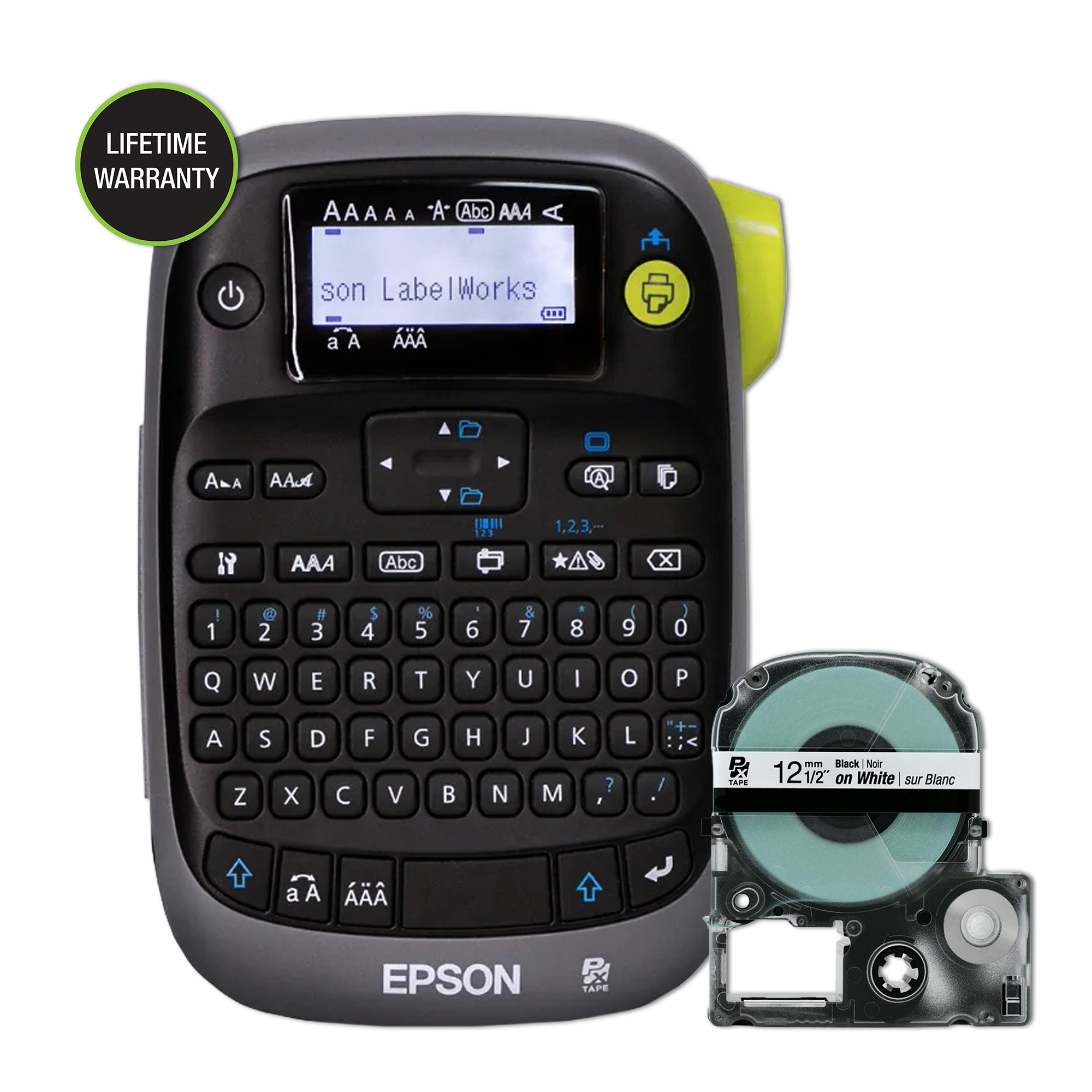
The LW-PX300 is a compact, self-contained way to compose industrial labels without bringing a phone or laptop to the printer. Its defining combination is a physical QWERTY keyboard, a back-lit monochrome screen and Epson’s PX cassette system. The printer-only SKU, LW-PX300, is a specific package—not the full kit pictured in some retailer listings. Epson lists the printer, a 12 mm black-on-white starter cartridge and an owner’s manual, but not an AC adapter, carry case or rubber guard. Six AA alkaline cells are also sold separately.
Typing at the machine is its central advantage
This is a good fit for work where a technician moves between a cabinet, cable run or storage area and types labels as needed. You can enter the text on the built-in keyboard, check the characters and length on the 130 × 48 back-lit monochrome display, and print without first preparing a design on another device. That is a genuinely different workflow from Epson’s phone-led PX400 or the computer-connected PX800. Epson’s specifications say data import is not available here, so I would not choose the PX300 to print a spreadsheet of asset numbers or to transfer prepared jobs from a computer.
The display is a text-and-settings check, not a preview of the finished print image. The manual shows text editing, multiple pieces of text (up to 50), copies, a one-part sequence counter and saved settings; it does not establish a large job database or multi-digit serialization. Those controls are useful for small batches and repeated labels, but they are not a replacement for desktop variable-data software. If typing on a small handheld keyboard is inconvenient, an app-first model may suit better; if local entry matters, the QWERTY keys are the reason to consider this machine.
PX tape reaches 18 mm, with a purpose-built industrial range
Epson lists thermal-transfer printing at 180 dpi, a 9.1 mm print head and a top speed of 6 mm per second when the AC adapter is used. Its supported PX cassette widths are 6, 9, 12 and 18 mm. Those are cartridge widths, not a promise that characters can use the whole width; the head-width figure is not an independently measured or explicitly stated maximum text height. The PX system offers multiple material and color combinations, including standard industrial tape, magnetic, vinyl, high-adhesion and silver-matte stock. Changing the tape color changes the label appearance, not the printer’s monochrome output into full-color photos.
Special jobs are more considered than a plain text maker. The guide documents cable-wrap and three cable-flag layouts, three folder-tab sizes, ribbon labels, barcodes and two compatible heat-shrink sizes. The supported barcodes are Code 39, Code 128, ITF, Codabar, UPC-A, UPC-E, EAN-8 and EAN-13; Epson specifically advises checking printed codes with a reader. It does not make QR codes. Heat-shrink labels require the 3 mm or 5 mm Epson PX tubing and a separate heat gun; the manual directs the user to follow that tool’s instructions. These are useful on-device tools, but not broad computer-aided layout features.
Budget for manual finishing and tape lead-in
The cutter is manual: after printing stops, the operator presses the cut button. There is no documented automatic full cut, and the source explicitly says Drop-Stop and Pick-and-Print are absent. That suits occasional labels, but someone printing repeated runs must pause to cut each strip. The manual says the “None” margin setting prints a cut mark for scissors, while standard industrial tapes have a minimum 10 mm lead margin. That lead-in can consume noticeable tape on short equipment tags, so batch tasks with many tiny labels deserve a trial on the exact cassette before buying supplies in bulk.
The handheld body is about 110 × 170 × 56 mm and 400 g before batteries or a tape cartridge. Epson specifies an operating range of 10–35 °C. For off-outlet work, the printer takes six AA alkaline batteries; the guide does not establish a supported rechargeable pack. A dedicated APT0615Z2-1 adapter is an available accessory, but it is not included with this printer-only SKU. Check the exact box contents rather than assuming every LW-PX300 listing includes the adapter.
Choose the package that matches where it will live
Choose LW-PX300 if local typing and a modest, field-portable setup matter more than a power adapter or protective carry gear in the box. If you want the adapter included but do not need a case, compare the separate LW-PX300ADPT package. If you also need the industrial case and rubber guard, the LW-PX300VP full kit adds those items. All three use the same 18 mm PX platform and retain the same manual cutting, monochrome printing and no-data-import limits. If you need cassettes wider than 18 mm, compare the QWERTY-and-USB PX700 or the wider PX900 family instead. If your essential need is app composition, QR printing or automatic cutting, choose a different verified operating setup rather than assuming this keyboard machine can be upgraded into one.
Key details at a glance
| Full-color output | No |
|---|---|
| Print process | thermal transfer |
| Maximum tape width | 18 mm |
| Compatible cassette | The Epson LW-PX300 manual and exact offer pages specify dedicated LabelWorks PX cassettes only. Cassette width is not printable character height; do not substitute Brother TZe or DYMO D1 media. |
| Built-in templates | 8 |
| Display type | back-lit monochrome LCD |
More specifications and setup details
| Line-count note | The guide has a “too many lines” error but does not state a numeric maximum line count. |
|---|---|
| What the base package supplies | Exact contents are taken from this offer’s U.S. manufacturer page, not inferred from another PX300 package or image. Batteries are not listed as included. |
| Letter-key arrangement | qwerty |
| Carry case in original package | No |
Use the exact model’s instructions for operating limits, supplied equipment and version differences.
Sources for this assessment

Put the device and its tape system together.
Match the exact model, cassette family, computer or network route and any optional power or touch-panel hardware before buying.