
On this page
Your needs, this model
Does it fit your priorities?
Will local QWERTY entry and a full field kit suit a carry-between-jobs routine?
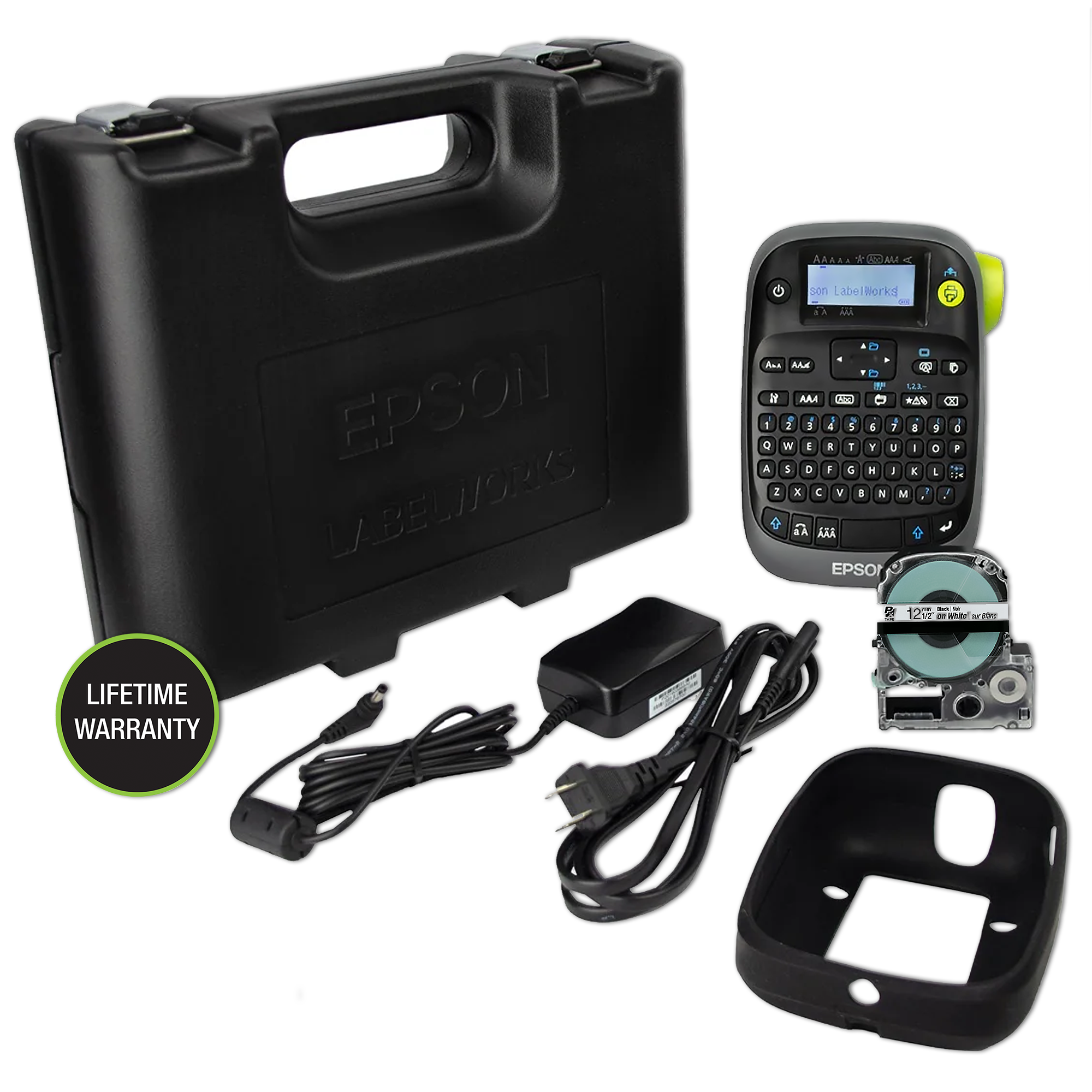
Yes. The VP offer is the exact PX300 full kit with the printer’s local keyboard plus its adapter, rubber guard and industrial carrying case.
Explore this need in the finder →Do you need the on-device cable-flag layout on PX tape up to 18 mm?
The guide names horizontal, vertical and edge cable flags and lists Epson PX widths through 18 mm; 24 mm cartridges are outside this model’s limit.
Explore this need in the finder →Is the supplied case and AC adapter enough, even without a rechargeable pack?
The package includes the case and dedicated adapter, but the guide specifies six AA alkaline cells as its battery route and does not document a rechargeable pack.
Explore this need in the finder →Does a person-operated cut button fit your finish routine, with no need for an automatic full cut?
Yes for hand-operated finishing: the guide says to wait for the tape to stop and press the Cut Button. It is a button, not a lever, and the model does not cut automatically.
Explore this need in the finder →Epson LabelWorks LW-PX300VP review
LW-PX300VP is the bundle to examine when the Epson PX300 itself suits you but you want its field gear supplied from the start. The exact Epson SKU page lists the printer, a 12 mm black-on-white starter PX cartridge, a dedicated AC adapter, rubber bumper guard, owner’s manual and industrial carrying case. That is not a cosmetic bundle name: the case and guard change how convenient the handheld is to move and protect, while the adapter gives you an outlet-powered option without sourcing the accessory separately. It remains the same PX300 printer, not a wider or connected model.
The bundle benefits a carry-between-jobs routine
The PX300 is designed around local typing. Its built-in QWERTY keyboard and 130 × 48 back-lit monochrome LCD let a worker enter and check a short label at the installation point. That can be simpler than switching to an app or returning to a desk when a single wire, shelf or equipment tag needs replacement. The manual describes saving up to 50 pieces of text and creating copies, plus one-part incrementing. Epson also says data import is unavailable, however, so do not treat this as a list-management or spreadsheet-batch printer. The screen checks text and length, not the final image preview.
When you take it to a site, the case holds the kit’s supplied equipment and the bumper guard is the model-specific protective accessory shown on the manufacturer page. The guide still says six AA alkaline cells are needed for battery operation and lists them as not included. The adapter in the VP kit supports the dedicated mains route; it does not make the unit rechargeable or remove the option of AA operation. If the job is mostly at a bench and you never need the case or guard, the lower-equipment LW-PX300ADPT package includes the adapter without those carry accessories. The base LW-PX300 includes neither adapter nor case.
PX media is industrially useful, but not very wide
The printer uses Epson LabelWorks PX cassettes at 6, 9, 12 or 18 mm. The exact specifications describe thermal transfer at 180 dpi, a 9.1 mm head and up to 6 mm per second with the AC adapter. This is not the same supply system as Brother TZe or DYMO D1, so an existing supply cabinet is relevant before you choose. Epson lists standard industrial stock and specialty options such as magnetic, vinyl, high-adhesion and silver matte tape. The supplied 12 mm black-on-white cartridge is pictured; Epson notes that its pictured vinyl cartridge may be substituted with an equivalent standard polyester cassette, so the precise starter stock material is not guaranteed by the image alone.
For maintenance and cable identification, the on-device special forms are useful: the guide documents three folder-tab sizes, three flag orientations, cable wrap and ribbon, as well as heat-shrink printing. Compatible tube sizes are Epson PX 203 (3 mm) and 205 (5 mm); the manual says printing on tube can appear light and directs the operator to adjust print density if needed. Eight barcode symbologies are supported, including Code 128 and UPC/EAN variants, but Epson says to verify printed barcodes with a reader. The machine does not create QR codes. A broad choice of cassette colors is still monochrome thermal-transfer output, not a full-color label maker.
Manual cutting is part of the workflow
The unit has a human-operated cut button rather than automatic full cutting. The operator waits for the print to stop and then presses the button. This helps keep the mechanism simple, but it adds a pause to every label run. The guide says a zero-margin option prints a cut mark for scissors, and Epson gives a minimum 10 mm lead on standard industrial PX tapes; on repeated short labels that starter length can matter. Drop-Stop and Pick-and-Print are not supported. If your workload is long sequences of labels that must separate automatically, compare an auto-cutter model instead of assuming the full kit changes the printer’s cut behavior.
The case does not make the unit weatherproof. Epson’s manual specifies operation from 10 to 35 °C and warns against use or storage where the product can get wet, very hot, dusty or subjected to impact. Its dimensions are approximately 110 × 170 × 56 mm, and the body weighs about 400 g before cells and tape. The guard helps with handling but is not a substitute for keeping the printer within those conditions.
Who should buy the VP arrangement?
Choose LW-PX300VP if you want to carry an on-device QWERTY PX labeler between work locations and prefer the supplied case, guard and adapter over assembling those extras separately. The bundled accessories pair well with small maintenance and facilities tasks that use 6–18 mm PX stock and need cable flags, wraps, folder tabs or barcodes. Pick LW-PX300ADPT if you need the adapter but not the case/guard, or the plain LW-PX300 if you will source power and protection separately. For wider PX stock, data import, a computer workflow or automatic cutting, the PX700, PX800 or another separately verified Epson model is a more suitable comparison; the VP bundle adds equipment, not those capabilities.
Key details at a glance
| Full-color output | No |
|---|---|
| Print process | thermal transfer |
| Maximum tape width | 18 mm |
| Compatible cassette | The Epson LW-PX300 manual and exact offer pages specify dedicated LabelWorks PX cassettes only. Cassette width is not printable character height; do not substitute Brother TZe or DYMO D1 media. |
| Built-in templates | 8 |
| Display type | back-lit monochrome LCD |
More specifications and setup details
| Line-count note | The guide has a “too many lines” error but does not state a numeric maximum line count. |
|---|---|
| What the base package supplies | Exact contents are taken from this offer’s U.S. manufacturer page, not inferred from another PX300 package or image. Batteries are not listed as included. |
| Letter-key arrangement | qwerty |
| Carry case in original package | Yes |
Use the exact model’s instructions for operating limits, supplied equipment and version differences.
Sources for this assessment

Put the device and its tape system together.
Match the exact model, cassette family, computer or network route and any optional power or touch-panel hardware before buying.