
On this page
Your needs, this model
Does it fit your priorities?
Do you want to type at the machine but retain a wired desktop-design route for more involved labels?
The PX700 body has a local QWERTY keyboard and a separate USB desktop-software route. The kit does not add phone, Bluetooth or Wi-Fi composition.
Explore this need in the finder →Is Epson PX the required cassette system, with support up to 24 mm?
The exact body uses Epson PX tape up to 24 mm; the PCD bundle does not change that cassette ceiling. This is not Brother TZe or a 24 mm maximum print-height promise.
Explore this need in the finder →Will you use its documented cable/panel formats and on-device barcode/QR tools?
The owner’s guide describes dedicated patch-panel, Block-66, faceplate, punch-block, cable-wrap and cable-flag formats, and supports barcode and QR creation. These are practical for repeated technical identifiers.
Explore this need in the finder →Must the original printer package include a rechargeable pack and a carry case?
The exact LW-PX700PCD package page lists a rechargeable Li-ion battery and industrial hard plastic case; the printer-only offer does not. Confirm that those exact items remain with any used kit.
Explore this need in the finder →Epson LabelWorks LW-PX700PCD Deluxe Kit review
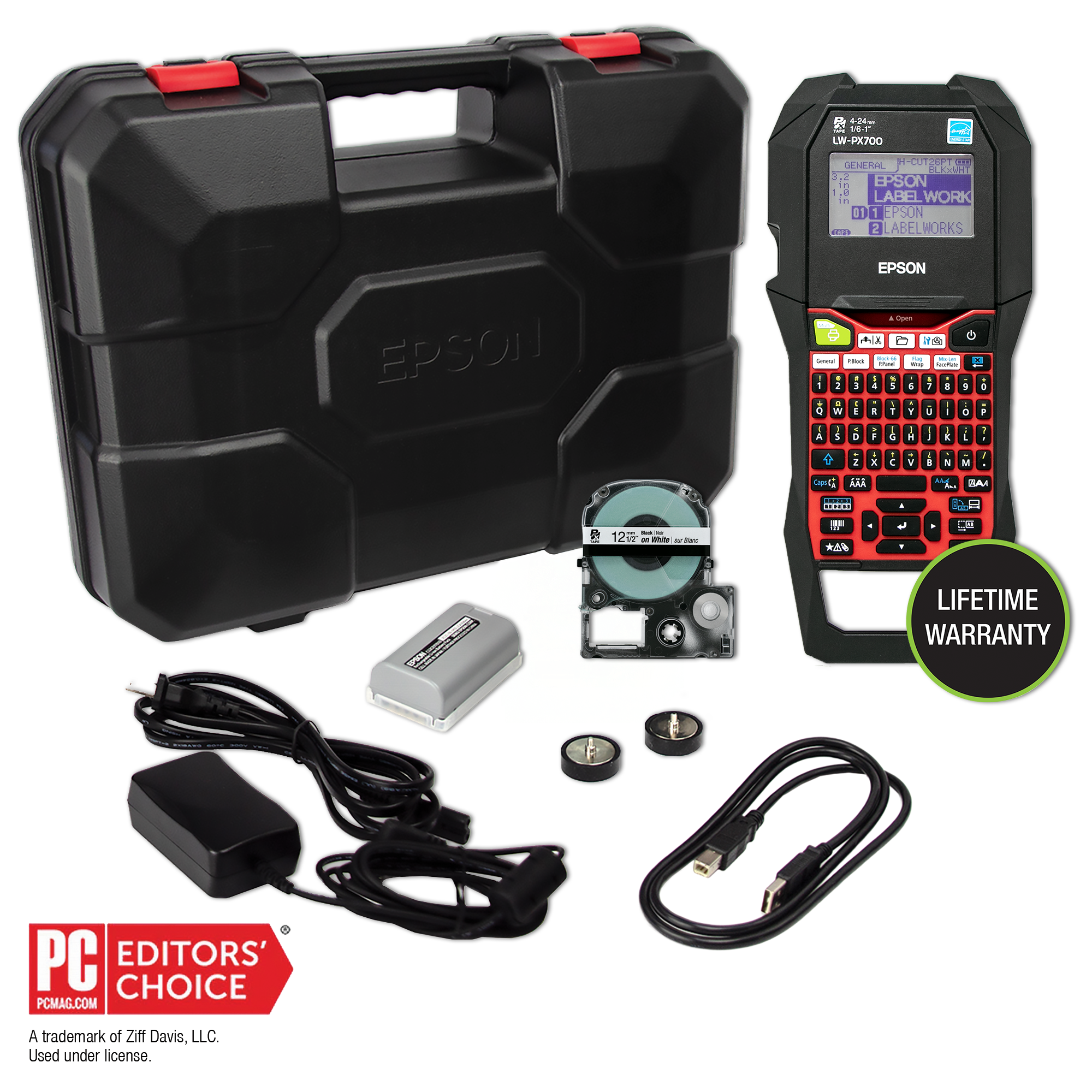
The LW-PX700PCD is not a different print engine from the LW-PX700 printer; it is the same keyboard-equipped PX machine sold with a more useful field package. Epson’s exact U.S. kit page lists a rechargeable battery, USB cable, adapter, hard case, two removable magnet attachments and a starter tape cartridge alongside the printer. That bundle matters when labels are made beside equipment rather than at one permanent desk. If you already have compatible power and a safe way to carry the printer, compare the printer-only LW-PX700 instead of paying attention to the word “Deluxe” alone.
The package changes the field setup
The included C52CE97010 Li-ion pack gives the printer a rechargeable route away from an outlet; the guide also permits six AA alkaline cells as a separate option. The AC adapter is included too. The hard case and two removable magnets suit a technician who carries the unit between work areas or wants to place it on a compatible steel surface. The package list does not say how strongly magnets hold, and a kit image cannot confirm that a used seller still has every item.
The page lists a 1/2-inch black-on-white starter cartridge, USB cable and Epson Label Editor software. That cartridge is only one of the printer’s dedicated PX supplies. For a used kit, confirm the case, battery and accessories are actually present and that the rechargeable pack is in usable condition.
One printer, two input routes
The LW-PX700 has a built-in QWERTY keyboard for local text entry, plus a USB interface for Epson Label Editor desktop work. Epson’s current downloads page lists the printer for the Windows program and for Label Editor on Mac. The model’s older owner’s guide uses the earlier application name Label Editor Professional, so check current system requirements rather than assuming every old driver version will work with a newer computer. A cable connection is documented; Bluetooth, Wi-Fi and a compatible phone-app workflow are not confirmed for this exact machine.
The PCD can bridge a technical bench and a field job: compose on the computer when a larger screen helps, or type on the printer itself at the equipment. The manual includes patch-panel, Block-66, faceplate, punch-block, cable-wrap and cable-flag formats, plus barcode/QR creation and sequential numbering. If you only label household containers occasionally, those tools and the added bulk may be unnecessary.
Use the correct PX media
Epson specifies a maximum tape width of 24 mm for this model, and the included body is a thermal-transfer PX cassette machine. The brochure lists widths from 4 through 24 mm, with dedicated supplies for standard polyester, vinyl, magnetic tape, self-laminating overwrap, nylon and heat-shrink tubing. A PX label is not a Brother TZe cassette or a DYMO D1 cartridge; the cassette families are not substitutes. Before ordering specialty stock, match the supply code, width and material to the task.
The 24 mm figure is cassette width, not printable text height. Epson lists an 18.1 mm print head and 180 dpi, but no maximum character height or line count for this model. Its 30 mm/s speed is specified with the adapter, and the brochure’s 4 mm lead applies to standard industrial tape; specialty supplies vary. Check the exact cassette for a tight panel fit.
Automatic cutting has material limits
The printer supports automatic full cuts and a half-cut that separates label from backing while keeping a series together. It also has a drop-stop behavior for applying sequential labels one at a time. These are helpful choices for production runs, but the manual warns that not all tapes can be cut by the blade. Epson recommends scissors for magnetic and nylon supplies to protect the cutter, and the heat-shrink instructions also recommend scissors. A manual hand-lever cutter is not documented. Confirm the material instructions before turning a special cassette into a high-volume auto-cut job.
The guide warns that adhesion depends on the surface and environment. Choose and test the tape for the material; a broad supply list is not a guarantee that every PX cassette suits every setting.
Its size and package make a deliberate tradeoff
The body measures about 136 × 298 × 90 mm and weighs 1,110 g before batteries and tape; the complete kit is heavier, and Epson does not list a package weight. This is a substantial handheld tool, not a pocket printer. The PCD makes most sense when the included battery and carrying equipment will see regular use.
The distinction from the base LW-PX700 printer is chiefly what arrives with the offer. Both share the same PX widths, keyboard, USB route and format workflows; the PCD’s extra battery, cable, case and magnets are documented package benefits. For a wider cassette ceiling, see the LW-PX900PCD, which is a separate machine with support up to 36 mm. For a smaller keyboard model, the LW-K740PX has a different body and PX limit. Do not confuse an extra in-box battery with a wider printer or a different media system.
Who should choose the PCD kit?
Choose the LW-PX700PCD if you need the printer’s local QWERTY input or USB desktop route, already plan to use Epson PX tape through 24 mm, and expect to benefit from the included rechargeable pack, case, cable and magnet feet. It fits a maintenance or equipment-labeling routine better than a phone-only workflow, and its prepared panel and cable formats are unusually relevant when labels must follow a repeated technical pattern.
Choose the base offer if those bundle components are unnecessary and you can use its included adapter and starter cassette. Choose another model if your essential requirement is full-color printing, a phone app, Wi-Fi, Bluetooth, a hand-operated cutter, or a documented print-height/line-count threshold: the exact LW-PX700 evidence does not verify those capabilities. The Deluxe kit solves a package problem, not every printer-fit question.
Key details at a glance
| Print process | thermal transfer |
|---|---|
| Maximum tape width | 24 mm |
| Compatible cassette | The exact LW-PX700 guide says to use dedicated PX tape. Width refers to cassette width, not guaranteed text height or printable area; PX is not interchangeable with Brother TZe or DYMO D1. |
| Built-in templates | 6 |
| Computer design route | Epson Label Editor desktop; the current downloads page lists LW-PX700 for Windows 10/11 and Mac. The 2016 guide names the prior Label Editor Professional release. |
| What the base package supplies | The exact product page lists this package; the base and PCD are separate Epson offer SKUs for the same LW-PX700 body. Do not infer the PCD accessories from a printer-only listing or from a used seller’s photograph. |
More specifications and setup details
| Letter-key arrangement | qwerty |
|---|---|
| Carry case in original package | Yes |
Use the exact model’s instructions for operating limits, supplied equipment and version differences.
Sources for this assessment
- Epson LabelWorks all-printers U.S. listing, page one; exact card and link
- Epson LabelWorks exact LW-PX700PCD product page and package contents
- Epson LabelWorks LW-PX700 User’s Guide, English, Version 01
- Epson LabelWorks LW-PX700 brochure
- Epson LabelWorks Product Brochures & Manuals page
- Epson LabelWorks current software downloads and compatible printers
- Epson LabelWorks exact LW-PX700PCD product-page image

Put the device and its tape system together.
Match the exact model, cassette family, computer or network route and any optional power or touch-panel hardware before buying.