
On this page
Your needs, this model
Does it fit your priorities?
Do you need to type on the printer itself and also connect it to a computer for longer designs?
The LW-PX900 has its own QWERTY keyboard and Epson documents USB desktop design with Label Editor. It is a computer-connected PX machine, not a phone/Bluetooth printer.
Explore this need in the finder →Is Epson LabelWorks PX media essential, and does your work need the family’s widest 36 mm cassette?
The exact PCD package contains the LW-PX900 printer. Epson specifies PX cassettes through 36 mm; the manual also says to use dedicated PX tape only. A 36 mm cassette does not establish the maximum text height or printed area.
Explore this need in the finder →Does the exact package need to include a rechargeable battery, AC adapter and protective case?
Epson’s exact U.S. PCD package list includes one rechargeable Li-ion battery, the AC adapter and a hard plastic case. Its guide separately documents six AA alkaline cells as an alternate power route.
Explore this need in the finder →Would you use the printer’s on-device wire and panel formats, barcode/QR tools and automatic cutting?
The manual documents dedicated cable-wrap, cable-flag, patch-panel, faceplate and block-terminal workflows; Epson also lists QR codes, eight keyboard barcode types, and automatic full/half cutting.
Explore this need in the finder →Epson LabelWorks LW-PX900PCD Deluxe Kit review
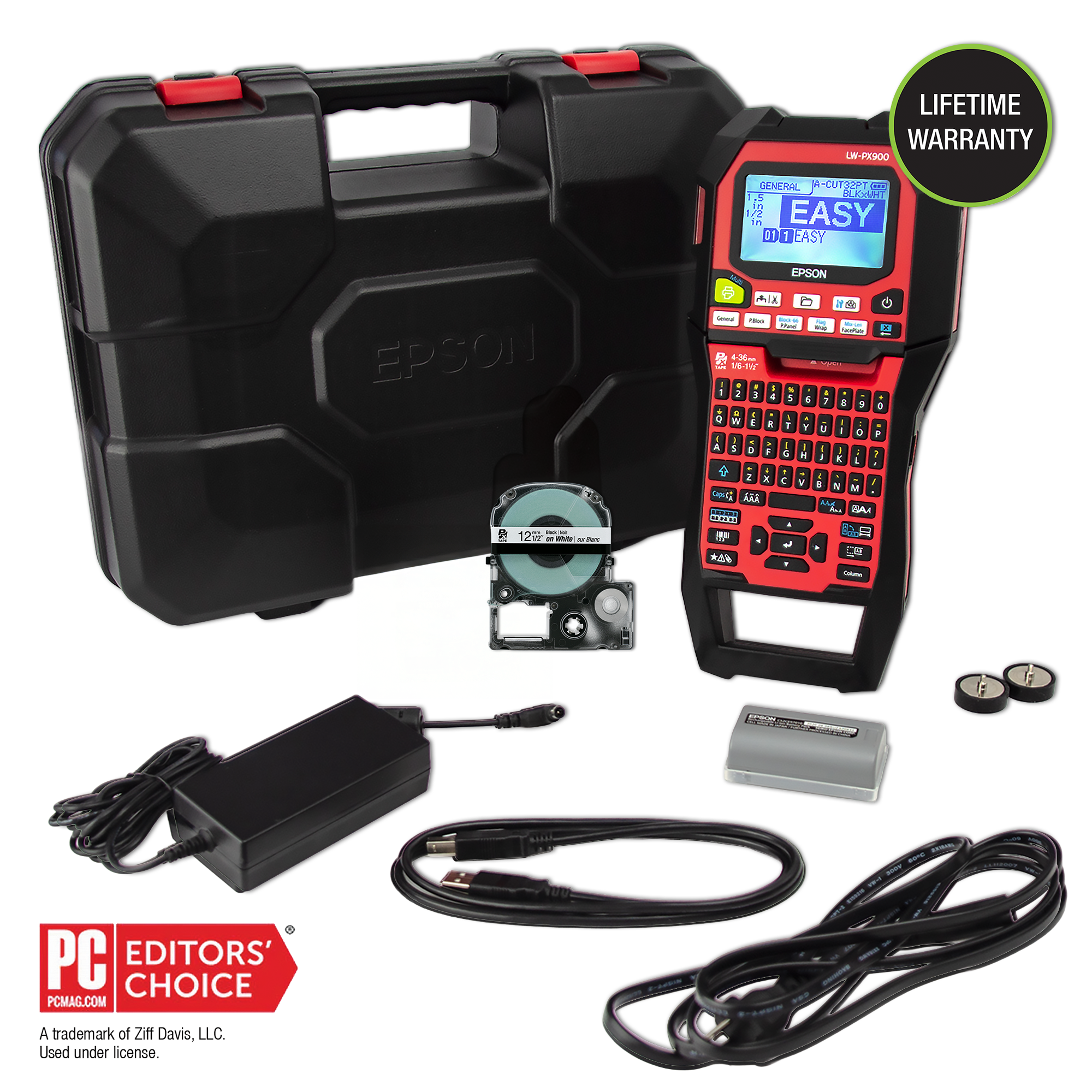
The LW-PX900PCD is a package decision as much as a printer decision. Its center is Epson’s wide-format LW-PX900, but Epson’s U.S. listing identifies the PCD Deluxe Kit as a separate offer with a rechargeable battery, AC adapter, USB cable, a starter PX tape, two removable magnets and a hard case. If you need a field-ready setup rather than just the printer body, those pieces change the value of the exact package. They do not change the machine’s basic limits: PX cassette media, USB desktop printing, local keyboard entry and a substantial handheld body.
Two ways to design, neither one is phone-first
The printer has a physical QWERTY keyboard and a back-lit monochrome display, so a short identification strip can be composed without opening a computer. For a spreadsheet-fed batch or a more deliberate layout, the manual describes connecting by USB and installing Epson Label Editor. Epson’s current software page also lists the LW-PX900 for its desktop editor on Windows and Mac. The package’s included USB cable and desktop workflow are useful when you want both local entry and a workstation option in the same device.
That versatility should not be mistaken for wireless flexibility. Epson’s product specification lists USB as the interface, and the current Label Editor Mobile compatibility list does not include the PX900. A phone app, Bluetooth link, Wi-Fi connection or Wireless Direct workflow is not documented for this printer. If phone composition is the center of your routine, the smaller LW-C610PX is a different Epson PX model with Bluetooth and a mobile app, but it tops out at 24 mm and has no built-in typing keyboard. If you want a physical keyboard and USB but do not need this kit’s 36-mm media ceiling, the LW-K740PX is another PX option with a 24-mm limit.
The 36-mm cassette is the practical distinction
The PCD kit supports Epson LabelWorks PX tape from 4 through 36 mm. Epson lists a 360-dpi thermal-transfer head, a 27.1-mm printhead width and a top speed of 35 mm per second when using the AC adapter. The wider cassette gives you room for larger identification layouts, multi-line work and longer cable or panel descriptions; it does not mean the printer can place ink across every millimeter of the tape. Media width, printable height and the size of your chosen layout are separate questions, so do not treat the cassette limit as a guarantee of full-width text.
Its operation is more specialized than a compact address-label maker. The manual shows cable-wrap and cable-flag formats, plus layouts for patch panels, faceplates and block terminals. The manufacturer also lists QR-code creation and eight barcode types from the handheld keyboard, along with serial numbering, data import, 892 professional symbols and storage for up to 100 files. An automatic cutter can full-cut or half-cut; the printer can hold a cut label until you pull it before continuing a batch. Those details suit repeated equipment and wire identification, where labeling the same kinds of locations matters more than decorative fonts or a tiny footprint.
Check what the exact kit includes
The product page lists one half-inch black-on-white cassette, Epson Label Editor software, a USB cable, the dedicated AC adapter, one lithium-ion rechargeable battery, two removable magnet attachments, an owner’s manual and a hard plastic case. The user guide says the printer can alternatively run from six AA alkaline batteries; it does not say the printer charges those cells. The dedicated rechargeable pack and the AA route are different options, and the PCD’s included pack is the useful part for work away from an outlet. On a used or open-box unit, verify that the battery, adapter, magnets, case and starter cassette are actually present.
This is not a pocket machine. Epson’s guide gives body dimensions of about 136 × 295 × 97 mm and a weight of about 1,250 g before the batteries and tape are fitted. The case makes that bulk easier to carry and protect, while the magnets offer a temporary mounting option on a suitable steel surface; neither turns it into a cordless phone printer. At a desk, the AC adapter is the straightforward power route, and the long body is easier to accommodate if you expect to print batches or use the onboard keyboard regularly.
Who should choose the PCD kit
Choose the LW-PX900PCD when you need the broadest PX tape width in this comparison, want a keyboard on the machine plus USB desktop design, and value the rechargeable pack and protective case in the original box. It is a particularly sensible fit for a workshop or technical labeling station that alternates between quick one-off labels and organized batches. The K740PX can be a better fit if 24-mm tape is enough and a rechargeable pack or hard case is not central; the C610PX trades the keyboard and wired computer route for phone or Bluetooth composition at the same 24-mm maximum. These alternatives stay within the Epson PX family, but the workflows are not interchangeable.
Look elsewhere if a phone app or wireless printing is essential; Epson does not document those routes for this model. The product page describes a thermal-transfer PX workflow, not full-color photo output, and the sources do not establish a manual cutter or a confirmed print-height or line-count threshold. Epson’s published sources document a 36-mm cassette, but not a maximum combined text height for this exact printer; a 4-line display is not proof of 4-line output. The safest reason to buy this exact PCD package is its documented combination of local keyboard, USB desktop design, wider PX media and bundled field accessories—not an assumed claim about every feature or every later resale box.
Key details at a glance
| Print process | Thermal transfer |
|---|---|
| Maximum tape width | 36 mm |
| Compatible cassette | The manual says to use dedicated PX tape. The 36 mm cassette maximum is not the same as a guaranteed printable height or full-width text area. |
| Built-in templates | 5 |
| Computer design route | Epson Label Editor desktop software; current download page lists LW-PX900 for Windows and Mac. |
| Body dimensions | Manual dimensions are approximately 136 × 295 × 97 mm; the orientation follows its width × depth × height order. |
More specifications and setup details
| What the base package supplies | This is the exact manufacturer-listed PCD Deluxe Kit package. A used/open-box listing may be incomplete; verify every accessory with the seller. |
|---|---|
| Letter-key arrangement | qwerty |
| Carry case in original package | Yes |
Use the exact model’s instructions for operating limits, supplied equipment and version differences.
Sources for this assessment
Put the device and its tape system together.
Match the exact model, cassette family, computer or network route and any optional power or touch-panel hardware before buying.