
Your needs, this model
Does it fit your priorities?
Would a local alphabetical keypad make occasional home or garden labels easier?
The GL100 has a built-in ABCD keyboard and no documented phone or computer design route. Brother’s U.S. page conflicts with itself on keypad layout, so verify a used unit if the arrangement is essential.
Explore this need in the finder →Is a 12 mm laminated cassette enough, rather than requiring wider TZe?
The documented GL100 routes reach 12 mm, but the older guide names TZ while the newer U.S. product page names TZe. It cannot meet an 18 mm TZe requirement.
Explore this need in the finder →Would optional AC operation help if a manual cut is acceptable?
Brother documents six AAA batteries and an optional AC adapter; the cutter is manual, so the GL100 is excluded when automatic trimming is essential.
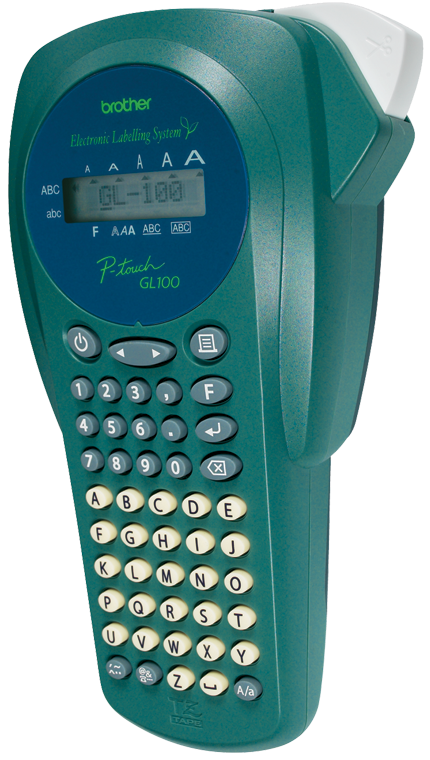
Explore this need in the finder →The Brother P-touch GL-100 is a discontinued handheld label maker that Brother marketed for home and garden use. Its distinctive appeal is a alphabetically arranged keypad on a compact, self-contained unit: you can compose short labels at the device rather than connect a phone or computer. Its laminated cassette format can suit plant pots, shed shelves, storage bins and household identifiers, but a used GL-100 is only a sensible fit when its actual tape family, cutter and power parts are clear.
Local typing, with a small scrolling preview
The GL-100’s one-line LCD shows eight characters at a time, while its manual says you can enter up to 55 characters. That is enough for a short plant name, room, drawer or tool designation, but long text must be scrolled on a small screen before printing. Brother specifies two fonts, five sizes, 59 symbols and 241 characters. The guide also includes bold, outline, shadow, italic, vertical and mirror styles, frames, numbering, nine-copy output and memory for up to nine text files within about 300 characters. Those are useful on-device choices for occasional labels, not an editor for complex desktop layouts.
The exact U.S. user guide draws the GL-100 with an alphabetical A-B-C-D keypad, and Brother’s U.S. product description calls it an ABCD keyboard. One technical table on that same current product page says “QWERTY,” so the page conflicts with its own description and the guide. The pictured unit and Brother’s exact U.S. support specification support the alphabetic arrangement, but if the key order is an essential buying requirement, verify the actual machine rather than relying on the contradictory web field.
Keep the cassette evidence in separate lanes
Brother’s exact U.S. GL-100 User’s Guide says to use only Brother TZ tape and lists 6, 9 and 12 mm cassettes. It says two-line labels need 9 or 12 mm tape; its small 8-character display makes a short sample worth printing before a batch. The current exact U.S. product page instead describes TZe laminated tape at 3.5, 6, 9 and 12 mm. Brother’s older U.S. support specification names “TZ-/TZe-tape” at 6, 9 and 12 mm but does not assign each width to each family. Treat these as separate source-specific routes, not a reason to assume that every cassette with the same width fits every surviving machine. If you already own the GL-100, check the cassette marking and your machine’s own guide before stocking up.
The guide describes standard laminated TZ tape for indoor and outdoor labels and recommends its extra-strength TZ adhesive for difficult surfaces such as wood, painted metal and textured plastics. That is useful context for a garden-oriented machine, but it is not a promise that every label will stay attached on any pot, stake, rough surface or exposure schedule. Choose the exact adhesive and tape construction for the surface; do not expose the label maker itself to rain or direct sunlight—the same guide warns against doing so.
A manual cutter and simple power routine
This is a hand-held labeler, not an automated production printer. Brother’s exact support specification and guide show a manual cutter lever rather than an automatic cutter, so it will not trim each label for you. The GL-100 runs on six AAA alkaline batteries, and the U.S. guide lists an optional AD-30 or AD-24 AC adapter. The adapter is a separate route, not a verified included item. At 4.32 × 7.84 × 2.2 inches with the cutter lever and about 0.73 pounds before tape and batteries, it is easy to move between a potting bench and a storage cupboard, although it is larger than a current pocket-sized Bluetooth printer.
Brother’s old support table lists 180 dpi, 10 mm per second and a 9 mm maximum print height. The guide also offers six automatic label-length formats and adjustable lengths from roughly 1.6 to 12 inches. These figures describe a small text labeler; they do not tell you whether a particular type size will remain legible on a narrow, curved pot. For multiple plant names or serial numbers, compose a short run, print one, and confirm the text and cut before continuing.
Who should look elsewhere?
The GL-100 suits an owner—or someone deliberately checking a verified used unit—who prefers local alphabetical typing, wants compact laminated labels and can work with a manual cut. It is a poor choice if automatic trimming, a phone app, Wi-Fi, computer editing, a wider-than-12-mm cassette, or an assured new-product package is essential. Brother marks it discontinued; inspect the battery compartment for leakage, the cutter for a clean manual cut and the feed path before depending on one. Do not assume a cassette, batteries or adapter remain with a particular second-hand offer.
If the practical goal is a currently documented standalone handheld rather than the GL-100’s garden-era design, compare the Brother PT-H110 review. That is a different model and tape setup, not a drop-in part for the GL-100. For a working GL-100, the machine’s own cassette marking and the appropriate guide matter more than a similar-looking Brother label maker.
Sources: Brother’s exact U.S. GL100 product page, U.S. GL-100 support specification, U.S. manual listing, the archived GL-100 User’s Guide, and Brother’s French GL100 product page for the exact-model image shown here.
Key details at a glance
| Full-color output | No |
|---|---|
| Print process | Thermal transfer |
| Maximum tape width | 12 mm |
| Compatible cassette | Keep two U.S. source-specific configurations separate: the GL-100 U.S. User’s Guide says use only original Brother TZ (6/9/12 mm; two lines on 9/12 mm), while Brother’s current exact U.S. product page identifies TZe (3.5/6/9/12 mm; two lines). The older U.S. support table combines TZ/TZe at 6/9/12 without mapping each width to each family. Verify the cassette marking and machine guide; do not assume same-width cassettes are interchangeable. |
| On-device preview characters | 8 |
| Display type | One-line 8-character LCD |
| Maximum combined print height | 9.14 mm |
| Maximum lines per label | 2 |
| On-device symbols | 59 |
| Saved label files | 9 |
| Power choices | Six AAA alkaline batteries; the U.S. support table names optional AD-30 AC adapter while the guide lists AD-30/AD-24. Included package accessories are not verified for a particular used unit. |
| Body dimensions | Brother U.S. specification: 4.32 × 7.84 × 2.2 inches with manual cutter lever; approximately 0.73 lb before batteries and cassette. |
| Tape cutting | The exact support specification and guide show a hand-operated cutter lever; automatic cutting is not documented. |
| Letter-key arrangement | alphabetical |
Use the exact model’s instructions for operating limits, supplied equipment and version differences.
Sources for this assessment
- Brother Office & Home observed GL100 row
- Brother U.S. GL100 product page
- Brother U.S. GL100 product-support page
- Brother U.S. GL100 specification
- Brother U.S. GL100 manual listing
- Brother GL-100 U.S. User’s Guide, version 02
- Brother France exact GL100 product page, product image source page
- Brother France exact GL100 image asset
- Brother U.S. support GL100 exact-model thumbnail
- Brother Canada GL100 product page
- Brother Canada GL100 product-image thumbnail
- Brother France exact GL100 product-page HTML access attempt
Put the device and its tape system together.
Match the exact model, cassette family, computer or network route and any optional power or touch-panel hardware before buying.