
Your needs, this model
Does it fit your priorities?
Will a confirmed Brother M cassette in 9 or 12 mm cover the label job?
The PT-65 U.S. support specification and family manual document M tape at 9 and 12 mm; Brother’s current M-231 tape page also lists PT65VP. The exact page widget conflicts by claiming TZe, so the conservative match is M only.
Explore this need in the finder →Would you rather enter short text on a built-in QWERTY keyboard than design on a phone or computer?
The PT-65 specification documents a 43-key QWERTY keyboard and no PC connection; the guide describes handheld composition. No phone workflow is documented.
Explore this need in the finder →Can the two-line format stay at the manual’s smallest size, with no larger-than-6.8-mm print requirement?
The manual allows two lines only at SIZE1/NORMAL and the detailed PT-65 specification gives 6.8 mm maximum print height. A required larger print height is not met.
Explore this need in the finder →A discontinued PT-65 variant whose tape code matters
The PT65VP is a distinct Brother U.S. catalog identity, but the available evidence points to a PT-65 family handheld rather than a different printing platform. Brother’s Office & Home directory lists “PT65VP — Brother P-touch PT-65VP Brother P-touch Labeler,” and its current U.S. product page marks the exact SKU discontinued. That page gives little practical description and its modern specification widget conflicts with the older PT-65 operating records. I would treat this as an earlier, used-unit reference, not an easy current purchase recommendation. The PT65VP suffix by itself does not prove a particular carry case, extra cassette, or power accessory was in the box.
Use the M cassette evidence, not an unsupported TZe assumption
Brother’s PT65VP product-page widget lists TZe laminated tape and widths from 3.5 to 12 mm. That conflicts with Brother’s PT-65 U.S. User’s Guide and detailed support specification, which describe M cassette tape at 9 and 12 mm, a non-laminated label system. Brother’s own current M-231 supply page independently names PT-65VP as a compatible model, and the PT-65 manual identifies M cassette codes and sizes. On that cross-check, the conservative profile here is M tape only, 9 or 12 mm; the page widget is recorded as a manufacturer-data conflict, not treated as a second tape route. If buying for an existing machine, check the cassette code itself rather than relying on width alone. A 12 mm TZe cassette is not interchangeable simply because an M cassette may also be 12 mm.
This is a modest, simple supply system rather than a durable laminated one. The manual documents the classic adhesive-backed M cassette. It does not establish that these older supplies are easy to find today, or promise that a label will withstand repeated cleaning, moisture, abrasion, or outdoor exposure. Confirm supply availability and the actual cartridge before planning a large labeling project. The machine is a poor choice if a laminated TZe label is an essential requirement.
Direct keyboard entry and short, carefully formatted text
The PT-65 family guide documents a QWERTY keyboard, a one-line display that shows eight characters at a time, and a message buffer of up to 55 characters. You compose on the handheld itself; the U.S. support specification says there is no PC connection. The guide offers five text sizes, multiple character styles, frames and preset layouts, but those options do not turn the small screen into a page-layout preview. Brother lists a two-line maximum, while the manual limits two-line printing to its smallest size and normal style. The documented maximum character height is 6.8 mm. If your label must show two lines in larger type or meet a specified 9 mm print-height minimum, this profile does not qualify.
This operating style can still suit occasional short labels for drawers, craft supplies or household containers when the user prefers typing locally over opening an app. It is not a good fit for batch editing, barcodes, computer-designed layouts, wireless printing, or long repeated jobs. There is no documented automatic cutter: the manual describes advancing and cutting tape by hand. Do not expect the convenience of a current app-connected label maker.
Power, package contents and the picture
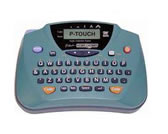
The shared PT-65 U.S. guide specifies six AA alkaline batteries and a manual cutter. It also lists a carrying case as an accessory, but does not say that the PT65VP package includes it. The exact U.S. product page does not resolve the suffix-specific box contents, so case inclusion remains unknown rather than assumed. The Brother support image used on this page depicts the teal PT-65 handheld and keyboard; it is a family-level view of the base machine, not a photograph of the PT65VP box or bundle. Brother does not label whether that image is a photograph or a rendering. Check the seller’s actual package inventory if a case or spare tape is important.
Who should choose it—and what to compare
Keep the PT65VP in consideration only if you already own one or are deliberately comparing an earlier used unit, want an on-device QWERTY keyboard, can work within short text and the two-line formatting restriction, and can verify genuine M tape in 9 or 12 mm. It should be excluded when TZe laminated tape, an app or computer, automatic cutting, a known included case, or larger print is essential. The product’s discontinued status and the unresolved kit contents add real purchase risk that a product-family resemblance cannot remove.
For another direct-entry M-tape path, compare our PT-M95 assessment, which evaluates its own display, tape, and power facts rather than transferring them to the PT65VP. If you specifically want a current-reference laminated TZe route, the PT-D220 review is a different supply system and should be treated as an alternative, not a compatible upgrade. The buying questions therefore change the shortlist: choosing M tape and accepting earlier models can surface the PT65VP; requiring laminated TZe, connected composition, taller text, or an included carry case should remove it.
Bottom line
The PT65VP is best understood as an earlier PT-65-family handheld with direct typing and a narrow, guide-backed M-tape plan. Its current Brother product-page table conflicts with the detailed PT-65 guide and Brother’s M-231 compatibility listing, so I do not credit TZe support. Nor do I infer what “VP” supplied. For an owner, confirm the cartridge family, battery condition and cutter operation before relying on it; for a new label-maker purchase, a currently documented system is usually easier to evaluate.
Primary references: Brother’s PT65VP U.S. product page and its PT65VP support landing page; Brother’s current M-231 tape page names PT65VP as compatible; the shared PT-65 U.S. detailed specification and manual index point to the PT-65 U.S. User’s Guide. The manual/specification are PT-65 family evidence; exact suffix package contents remain unverified. The exact page widget’s TZe data conflicts with those records and the M-231 compatibility list.
Key details at a glance
| Full-color output | No |
|---|---|
| Print process | thermal transfer |
| Maximum tape width | 12 mm |
| Compatible cassette | The shared PT-65 U.S. User’s Guide and detailed support specification identify non-laminated Brother M tape at 9 and 12 mm. Each exact current product page instead displays a specification widget listing TZe, laminated tape and 3.5/6/9/12 mm. Because that widget conflicts with the older family manual and detailed specification, this fact profile supports M only; a same-width TZe cassette is not inferred compatible. Present-day M cassette availability is not established. |
| Built-in templates | 9 |
| On-device preview characters | 8 |
| Display type | LCD |
| Maximum combined print height | 6.8 mm |
| Maximum lines per label | 2 |
| Line-count note | Brother’s U.S. specification reports two lines. The PT-65 User’s Guide restricts two-line text to SIZE1 and NORMAL style; this is not an unrestricted multi-line layout. |
| On-device frames | 6 |
| On-device symbols | 178 |
| Power choices | The PT-65 U.S. User’s Guide specifies six AA alkaline cells. It does not establish whether an exact PT65VP package includes batteries or an AC adapter. |
| Body dimensions | Brother U.S. support specification gives 6.0 × 4.2 × 2.4 in (152 × 106 × 62 mm). |
| Tape cutting | The PT-65 support specification and guide show a user-operated cutter; automatic cutting is not documented. |
| What the base package supplies | Exact PT65VP page does not state suffix-specific box contents. The PT-65 manual lists carry case 6991 as an accessory; it does not show inclusion in this SKU. |
| Letter-key arrangement | qwerty |
| Wired Ethernet | No |
| Built-in type styles | 8 |
Use the exact model’s instructions for operating limits, supplied equipment and version differences.
Sources for this assessment
- Brother U.S. Office & Home directory exact PT65VP row
- Brother exact U.S. PT65VP product page
- Brother exact PT65VP support landing page
- Brother M-231 non-laminated tape compatibility page
- Brother PT-65 U.S. detailed support specification
- Brother PT-65 U.S. user guide (family manual)
- Brother PT-65 U.S. manual index
- Brother PT-65 U.S. family support image
Put the device and its tape system together.
Match the exact model, cassette family, computer or network route and any optional power or touch-panel hardware before buying.