
Your needs, this model
Does it fit your priorities?
Would a small standalone QWERTY label maker for short labels on earlier Brother M tape suit your work?
The exact-model Brother PT-75 leaflet shows a QWERTY keypad, one/two-line messages and M-K221/M-K231 cassettes at 9 and 12 mm. The U.S. page currently lists TZe instead, and the current U.S. M231/TZe231 pages do not list PT-75; identify the exact cassette before buying.
Explore this need in the finder →Are built-in preset layouts more useful than a phone or computer editor?
The PT-75 leaflet lists nine preset formats and built-in letter keys. No phone-app or computer-connected workflow is confirmed in the PT75 U.S. support response or the exact-model leaflet.
Explore this need in the finder →Can you accept manual cutting and six AA cells for earlier on-demand labels?
The exact PT-75 leaflet describes a physical cutter button and six AA alkaline cells. Automatic cutting and an adapter route are not established for this exact U.S. configuration.
Explore this need in the finder →The Brother P-touch PT-75 is an earlier, handheld label maker for someone who wants to type at the machine rather than compose on a phone. It is discontinued, so this review is most useful when identifying an existing PT-75 or evaluating a used one. Before choosing it, resolve the tape question: Brother’s current U.S. PT75 page lists TZe tape, but the Brother PT-75 leaflet names M cassettes, and the current U.S. product pages for M231 and TZe231 do not list this model as compatible. Those sources do not establish a safe, currently available U.S. cassette for every PT-75.
The cassette system is the deciding tradeoff
Brother’s exact U.S. PT75 listing identifies the discontinued machine and describes a QWERTY layout, two-line output and a label-length setting. Its current specification table also says TZe, laminated tape, thermal transfer and 3.5, 6, 9 and 12 mm widths. But the exact-model English leaflet on Brother’s site identifies the machine as PT-75 and names the earlier M cassette family, including M-K221 and M-K231 in 9 mm and 12 mm widths. That leaflet carries a Canadian regulatory statement, so it is not an exact U.S. manual. The current U.S. M231 page describes non-laminated tape but omits PT-75 from its compatibility list; the current TZe231 page likewise does not name PT-75.
This is a real documentation conflict, not a reason to pick whichever tape looks most familiar. Do not treat the current page’s generic TZe fields as proof that a TZe cassette fits a particular PT-75, and do not assume a currently sold M cassette replaces the leaflet’s older M-K cartridge. If you already own the machine, identify the model on its label and compare the cassette already fitted with Brother’s exact compatibility information before buying supplies. If you are considering a used unit, ask for a clear cassette-bay and cartridge-label photo. If a known cassette and usable cutter are not part of your plan, skip this model.
Direct keyboard entry keeps the job simple
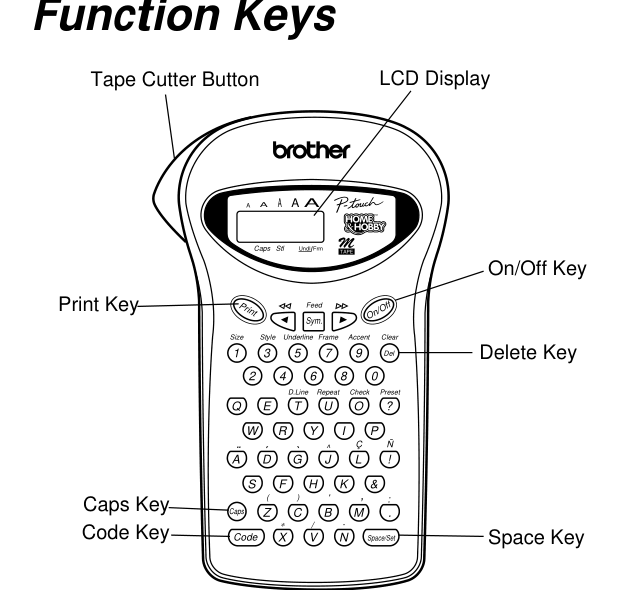
The manual depicts a compact QWERTY keypad with dedicated print, feed, size, style, frame, accent and preset controls. Its listed features include five text sizes, nine character styles, seven frame settings and nine preset layouts. A message can be up to 55 characters and printed on one or two lines. Those controls suit short pantry, craft-box, school-supply or drawer labels when typing a small amount of text on the device feels easier than opening another screen. The two-line ceiling and short message limit are also concrete boundaries: it is not a choice for long instructions, serialized data or a big mail-merge job.
The exact current U.S. product record and the older leaflet do not describe the same media system. The label-length control is confirmed, but the sources do not give a maximum print height or a complete range of lengths. A two-line option does not guarantee that a particular small type size will be readable on every width. For a label where legibility, a minimum print height or an exact cassette specification is essential, use only measurements from the matching PT-75 documentation and tape. Unknown dimensions should not be treated as a fit.
Manual operation and battery ownership
The leaflet shows feeding tape and pressing a physical cutter button; it does not document automatic cutting. The cutter unit is replaceable in the instructions, but present-day availability of the exact replacement is not established here. The same leaflet specifies six AA alkaline cells and advises removing them if the machine will sit unused for a long time. It describes a five-minute idle shutoff. No model-specific U.S. adapter or computer connection is confirmed by the sources reviewed for this PT-75, so do not buy it for mains-powered desk use, USB design or app-driven printing without evidence for the exact unit.
Brother’s instructions also warn against moisture, high temperature and excess dust, and explain basic print-head cleaning. Because the cassette evidence is unsettled, I would not promise that every PT-75 label is laminated, water-resistant or suitable outdoors. In particular, the laminated construction described for modern TZe media should not be transferred to an M cassette. Test an adhesive on the actual surface and environment rather than relying on the P-touch name.
Who should look elsewhere?
Choose another route if you need a known supply chain, laminated labels for repeated handling, more than two lines, a computer or phone workflow, automatic cutting, or a current warranty. A documented U.S. handheld such as the PT-70 is a more traceable comparison for an earlier M-tape keypad machine, while a current TZe model such as the PT-D220 is a better starting point when modern laminated cassette support matters. These are alternatives to compare, not proof that their media or accessories work in the PT-75.
The PT-75’s appeal is modest and specific: familiar on-device typing, simple short labels and several built-in formatting choices. Its age alone does not make it unusable, but the evidence does not support an unconditional recommendation. It makes most sense for an owner who can confirm the exact cassette already in hand and is content with manual cutting and batteries. For a buyer who needs a verified U.S. tape route before purchasing, pause here and select a model whose exact manual and consumables agree.
Key details at a glance
| Maximum tape width | 12 mm |
|---|---|
| Compatible cassette | Exact PT-75 leaflet lists M-K221 and M-K231 at 9 and 12 mm. Brother’s current U.S. PT75 data table says TZe/laminated/thermal-transfer at 3.5/6/9/12 mm, but the U.S. M231 and TZe231 compatible-model text does not list PT-75. Do not treat the current page field as a reconciled U.S. consumables path; buyers should identify a known-fit cassette for the exact unit. |
| Built-in templates | 9 |
| Display type | LCD |
| Maximum lines per label | 2 |
| On-device frames | 7 |
| Letter-key arrangement | qwerty |
| Built-in type styles | 9 |
Use the exact model’s instructions for operating limits, supplied equipment and version differences.
Sources for this assessment
- Brother U.S. Office & Home directory row PT75, offset75/index86
- Brother U.S. exact PT75 product page
- Brother U.S. exact PT75 product-support page
- Brother legacy U.S. support route for PT75 (redirected to exact product-support page)
- Brother U.S. manual-index attempt for exact PT75 route key
- Brother English PT-75 instruction leaflet (Brother Canada host; exact model, Canadian regulatory statement)
- Brother U.S. M231 current supply page
- Brother U.S. TZe231G current supply page
Put the device and its tape system together.
Match the exact model, cassette family, computer or network route and any optional power or touch-panel hardware before buying.