
Your needs, this model
Does it fit your priorities?
Do you need a built-in QWERTY keyboard for direct label entry?
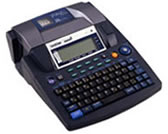
The exact U.S. support page identifies a QWERTY keyboard; the guide also describes standalone keyboard input. This older discontinued model is useful as an existing-unit reference, not a current purchase recommendation.
Explore this need in the finder →Would the wider original TZ cassette family fit your existing setup?
The exact PT-9600 U.S. guide and support specification list original TZ widths through 36 mm. The exact current Brother product page separately lists TZe only through 12 mm; do not transfer the TZ maximum to TZe.
Explore this need in the finder →Can a documented USB/serial computer route work with the host and software you can verify?
Brother documents USB and RS-232C serial connections, but its period software requirements are old. The connector alone does not establish compatibility with a present-day computer or operating system.
Explore this need in the finder →Is automatic cutting useful, while current app or wireless operation is not essential?
Brother documents automatic full and half cutting and a physical keyboard, but not Wi-Fi or a mobile-app input workflow. This is a discontinued workbench model with no current software support claim.
Explore this need in the finder →A substantial older workbench unit, not a current everyday pick
Brother’s U.S. page identifies the PT9600 as the P-touch PT9600 PC-Connectable Professional Labeling System and labels it discontinued. It makes sense as a reference for someone who already owns one or is evaluating a complete used setup, not as a claim about a new, stocked product. Its appeal is unusual for a label maker: a full-size QWERTY keyboard and a broad documented original TZ tape range sit alongside USB and RS-232C computer connections. The model-specific 2003 brochure calls out industrial and commercial jobs, including identification and barcodes. Do not confuse those capabilities with modern software or replacement-stock guarantees.
Do not flatten the media records into one promise
There is a real cassette-profile conflict in Brother’s U.S. material. The PT9600 User’s Guide and support specifications document the original TZ family in widths from 6 through 36 mm; the guide’s table gives progressively more lines as the tape widens, up to 16 on 36 mm. By contrast, the exact PT9600 U.S. product page lists standard TZe tape from 3.5 through 12 mm and a two-line maximum. Those numbers belong to two separate manufacturer records, not a reason to assume 36 mm TZe compatibility. The 2003 brochure discusses TZ and industrial laminated tapes, while the later guide and support specifications describe TZ. If buying supplies for an existing machine, inspect its model label, cassette bay and the code printed on a known cassette, then verify the exact cartridge. Width alone is not a compatibility test.
Within the guide-backed TZ profile, the printer is much more capable than a small handheld: Brother lists a 384-dot print head at 360 dpi, a 4-foot (1 m) line buffer, up to 16 lines in a block, up to 50 blocks and roughly 10,000 characters. The manual’s tape-width table caps line counts by cassette width; a 36 mm tape is not required for every job, and a narrow 6 mm cassette is not a multi-line sign stock. Brother also documents the three AV address/file label sizes in the guide, but that is a separate die-cut format, not a generic roll or paper-label route. The exact product page’s TZe profile is narrower and has its own two-line ceiling. Questionnaire choices for width and family therefore need to be read together.
Standalone editing and legacy computer input
The built-in, typewriter-style QWERTY keyboard and backlit display let the PT9600 compose a job without opening design software. The guide specifies a 68-key keyboard and a 24 × 119-dot LCD; the product page and period brochure describe a large 20-character-by-three-line display. The documentation varies in how it describes the display dimensions, so do not treat those summaries as a measured character capacity. The useful point is that it previews multiple lines and is designed for direct entry. Ten built-in fonts, a range of styles and sizes, symbols, barcodes, date/time insertion, numbering, templates and programmable function keys serve repeatable asset or maintenance jobs. These are built-in and downloadable design features, not a claim that current database software will run on a present-day computer.
Brother documented both USB and RS-232C serial connections and PC/Mac design software. That is a rare flexibility for the age, but the official 2003 brochure specifies Windows 2000/Me/98/98 SE/XP and Mac OS 8.6 or later, with a note that Mac OS 10.2 was not compatible. That old compatibility list is not evidence of support for current operating systems. A USB plug does not solve driver, application, cable or host compatibility by itself; a serial setup may require an appropriate old computer and cable. Treat computer design as a legacy capability, not a promise of modern plug-and-play. If a present-day workflow is essential, compare current-reference desktop or app-based models and confirm their exact OS support before choosing.
Automatic cutting, power and the original box
The exact guide and brochure describe an automatic full cutter and half-cut function for producing peelable labels, including strips. This is materially different from a handheld with a manual lever: it can reduce repetitive cut steps during a run. The brochure also documents an AC adapter/charger and a rechargeable Ni-MH battery pack, as well as a protective carrying case, USB cable and sample TZ tapes in the original carton. Those are period brochure contents, not a guarantee that a used unit still has them. Check each item in the seller’s actual package and confirm the battery can hold charge; no battery-life or current replacement-parts claim is made here.
Who should keep or compare one
The PT9600 suits an existing owner who wants its wide original-TZ profile, standalone keypad, automatic cutting or a documented legacy serial/USB path. Its scale and 4.41 lb support-spec weight make it a bench or worksite machine rather than a light pocket labeler. It is a poor fit when the essential need is current software support, wireless/mobile composition, guaranteed new supplies, an uncomplicated TZe 18–36 mm route, or a verified in-box accessory in a used listing. Brother’s current page labels the model discontinued, and this review does not infer present availability.
For a modern wide-tape setup, compare Brother’s current-referenced PT-P950NW and check whether its networking, computer route, tape family and present software match your job. For a smaller on-device workflow, the PT-D410 is a different current-reference class, not a substitute for the PT9600’s documented TZ widths, 16-line capability or serial connector. The right question is not whether a new model looks similar; it is whether its exact documented media and input plan fits your labels and host system.
Key details at a glance
| Full-color output | No |
|---|---|
| Print process | Thermal transfer |
| Maximum tape width | 12 mm |
| Compatible cassette | Brother's exact U.S. PT9600 product page marks the model discontinued and lists TZe through 12 mm with a two-line maximum. Its exact U.S. User's Guide and support specification instead document original TZ through 36 mm and up to 16 lines. Keep those as separate operating profiles; 36 mm is not represented as a TZe width. The guide also specifies three AV die-cut formats; those are separate shapes, not tape-width equivalents. |
| On-device preview characters | 20 |
| Display type | Monochrome LCD with backlight |
| Maximum lines per label | 16 |
| Line-count note | The exact model's User's Guide gives up to 16 lines per block, with a width-specific TZ table from 3 lines on 6 mm through 16 lines on 36 mm. The exact product page's TZe profile specifies a two-line maximum. Separate these tape profiles when choosing a layout. |
| On-device symbols | 440 |
| Saved label files | 100 |
| Computer design route | Brother P-touch Editor; period brochure system list includes Windows 2000/Me/98/98 SE/XP and Mac OS 8.6 or later, and says Mac OS 10.2 was not compatible. No current OS support is asserted. |
| Power choices | The 2003 brochure lists an AC adapter/charger and rechargeable Ni-MH pack in the original PT-9600 carton. The guide's AC adapter rating is 24VDC, 1.5A, while the support specification says 24V, 2.5A. Check the exact device label and the included adapter; do not substitute a power supply from these conflicting ratings. Current used-unit package contents are not assumed. |
| Body dimensions | Brother U.S. support specification: 9 1/3 x 11 15/16 x 4 in (237 x 302 x 101 mm), W x D x H. |
| Tape cutting | Brother's exact U.S. support specification and PT-9600 guide document automatic full cutting and automatic half cutting for peelable labels. |
| What the base package supplies | The 2003 exact-model Brother brochure lists the original carton as PT-9600, protective carrying case, rechargeable Ni-MH pack, AC adapter/charger, USB cable, software/driver CD, one 1-inch black-on-white TZ cassette, one 3/4-inch industrial adhesive cassette and manual. This describes the period manufacturer carton, not contents or condition of any present used listing. Verify each item with the actual seller. |
| Letter-key arrangement | qwerty |
| Wired Ethernet | No |
| Built-in type styles | 12 |
| Carry case in original package | Yes |
Use the exact model’s instructions for operating limits, supplied equipment and version differences.
Sources for this assessment
Put the device and its tape system together.
Match the exact model, cassette family, computer or network route and any optional power or touch-panel hardware before buying.