
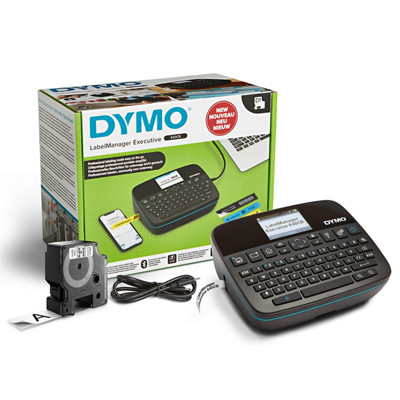
Your needs, this model
Does it fit your priorities?
Do you need a wide D1 cassette and up to five lines for a larger label?
The Executive 640 CB supports DYMO D1 at 6, 9, 12, 19 and 24 mm; the manual’s width table permits five lines only at 24 mm. DYMO D1 is not Brother TZe.
Explore this need in the finder →Would you like to type on a QWERTY machine or design through a phone app?
This exact machine provides a built-in QWERTY keyboard and Bluetooth mobile-app printing. The computer USB data route is not counted as confirmed because the guide contradicts itself about the included cable.
Explore this need in the finder →Do automatic cuts and a rechargeable pack fit your repeated-label routine?
The manual documents auto-cut after each label by default for multiple-label printing and automatic cutting for app prints; the included Li-ion pack is rechargeable. It does not document a hand-operated lever.
Explore this need in the finder →The Box QWY is the one-cassette package of DYMO’s rechargeable Executive 640 CB: a compact label maker with a built-in QWERTY keyboard and Bluetooth phone-app route. It makes most sense when you want to create a label right on the machine or lay one out on a phone, and you specifically want DYMO D1 tape rather than a different cassette ecosystem.
Wide D1 choices, but width still changes the layout
The Executive 640 CB accepts DYMO D1 Standard and Durable cassettes in 6, 9, 12, 19 and 24 mm widths. That is a useful spread: the narrow end suits file tabs and short identifiers, while the 24 mm option offers room for larger text and up to five lines. The manual’s line table is width-specific—one line at 6 mm, two at 9 mm, three at 12 mm, four at 19 mm and five at 24 mm. A wide cassette does not promise that every label should use five lines; more lines reduce the text size that fits. Match the tape to the job before designing a batch.
This is DYMO’s D1 family, not a general-purpose tape slot. The width numbers can look familiar beside Brother cassettes, but a 12 or 24 mm dimension does not make Brother TZe or another brand’s tape interchangeable. D1 Standard and Durable are the supplied media choices. Durable tape may suit some more demanding labeling situations, but it is not a universal guarantee for every surface or environment. DYMO’s guide says to clean a surface before applying and avoid extreme heat or sunlight; test the actual material before printing a large set.
Two useful ways to design
The built-in QWERTY keyboard means you can type a short label without opening another device. The graphical display lets you edit and preview your layout. For longer text, symbols, or app-based label creation, the LabelManager Connect mobile app communicates over Bluetooth Low Energy. The guide says the printer automatically connects when you print from the app; it does not require manual pairing, and the stated range is about 10 meters. That makes the phone route a real alternative rather than an unverified accessory promise.
The cutter behavior is more nuanced than a simple manual-versus-automatic checkbox. The manual offers an automatic cut after each label as the default for multiple-label jobs, and it says app-printed labels are automatically cut. It also describes a command to cut tape and an option to pause for a cut. The documentation does not identify a hand-operated cutter lever, so do not choose this model on the assumption that it has one. The on-device guide supports up to 20 copies of a label, 30 saved labels, and barcode creation; a barcode cannot share a multi-line label. QR codes are made through the app or desktop software, not the built-in barcode menu.
What this exact Box package supplies
DYMO’s itemized list for item 2197370 names the label maker, one standard cassette, a rechargeable battery pack, a USB-C-to-USB-C cable and a Quick Start Guide. The page does not identify that starter cassette’s width or color, so treat it as one uncharacterized cassette rather than assuming the exact D1 combination you want. No carrying case is listed. The three measurements shown by DYMO are 7.28 × 5.9 × 2.95 inches, but the page does not label their axes; measure the unit in person if a tight shelf opening is decisive.
The rechargeable Li-ion pack is included. The user guide says a full charge takes about three hours and permits use while charging, but the battery must remain installed; the cable cannot run the machine by itself. A 5V USB-C wall charger is not included. This is useful for a portable workbench or home office, but do not read the USB-C port as a guaranteed computer-printing connection: the same manual says the cable is only for charging in one section and describes desktop connection in another. DYMO’s product page also mentions USB-C and desktop software. If computer-over-USB printing is essential, count that function as unresolved and choose a configuration with unambiguous evidence, not just a connector-shaped promise.
When it fits—and when it does not
Choose the Box configuration if a single starter cassette is enough, you want the built-in keyboard plus an optional phone workflow, and D1’s 24 mm ceiling covers the label size you need. If you want more cassettes in the original package, the separately listed Kitcase configuration starts with three; the exact cassette contents and whether a carry case is actually included still need checking. If you already have Brother TZe supplies, stay with a P-touch model documented for TZe instead of adding another tape format. Neither Executive 640 CB package was orderable on DYMO’s U.S. product page when checked, so this is a product-fit review, not a promise of current stock.
For the exact package list, tape and software claims, see DYMO’s Box QWY product page and the LabelManager Executive 640 CB User Guide. The separate Kitcase review covers the three-cassette package.
Key details at a glance
| Full-color output | No |
|---|---|
| Print process | thermal transfer |
| Maximum tape width | 24 mm |
| Compatible cassette | DYMO D1 Standard and Durable cassettes only, widths 6, 9, 12, 19 and 24 mm per the 640 CB guide. D1 is a different cassette family from Brother TZe even where widths overlap. |
| Display type | graphical LCD |
| Maximum lines per label | 5 |
| Line-count note | The manual's line ceiling depends on cassette width: 1 line at 6 mm; 2 at 9 mm; 3 at 12 mm; 4 at 19 mm; and 5 at 24 mm. |
| Saved label files | 30 |
| Computer design route | DYMO Connect for Desktop is listed on the product page; host/cable data workflow remains unconfirmed by the contradictory manual |
| Power choices | A rechargeable Li-ion battery pack is listed as included. The guide says a 5V USB-C wall charger is not included; the machine can be used while charging but requires the battery pack to remain installed. The included cable alone cannot power it. |
| Body dimensions | DYMO lists 7.28 × 5.9 × 2.95 in but does not identify axes; width/depth/height are not assigned for physical-fit matching. |
| What the base package supplies | Exact page for item 2197370 lists one standard label cassette, rechargeable battery pack, USB-C-to-USB-C cable and Quick Start Guide. Cassette width/color are not specified; a carrying case is not listed, so its inclusion is unconfirmed. |
| Letter-key arrangement | qwerty |
| Built-in type styles | 6 |
Use the exact model’s instructions for operating limits, supplied equipment and version differences.
Sources for this assessment
Put the device and its tape system together.
Match the exact model, cassette family, computer or network route and any optional power or touch-panel hardware before buying.