
Your needs, this model
Does it fit your priorities?
Do you need a wide D1 cassette and up to five lines for a larger label?
The Executive 640 CB supports DYMO D1 at 6, 9, 12, 19 and 24 mm; the manual’s width table permits five lines only at 24 mm. DYMO D1 is not Brother TZe.
Explore this need in the finder →Would you like to type on a QWERTY machine or design through a phone app?
This exact machine provides a built-in QWERTY keyboard and Bluetooth mobile-app printing. The computer USB data route is not counted as confirmed because the guide contradicts itself about the included cable.
Explore this need in the finder →Do automatic cuts and a rechargeable pack fit your repeated-label routine?
The manual documents auto-cut after each label by default for multiple-label printing and automatic cutting for app prints; the included Li-ion pack is rechargeable. It does not document a hand-operated lever.
Explore this need in the finder →The Kitcase QWY keeps the same LabelManager Executive 640 CB label-making functions as the Box version but is a different package: DYMO’s included-parts list names three standard cassettes rather than one. That can save a first supply order if the included tape is useful to you. The exact cassette widths and colors are not stated, and the product title’s “Kitcase” wording is not enough to establish that a carrying case is included.
The machine behind the bundle
The core device has a built-in QWERTY keyboard, a graphical screen, a rechargeable lithium-ion pack and a Bluetooth Low Energy phone-app route. It is designed around DYMO D1 Standard or Durable cassettes, with documented widths of 6, 9, 12, 19 and 24 mm. The wide 24 mm cassette supports up to five lines in the manual; the line ceiling steps down with smaller widths, so two or three lines are not guaranteed on every tape size. If you commonly print a large number of narrow shelf or file labels, the tape width matters as much as the display or keyboard.
There are two different design routines here. You can type a basic job at the label maker itself, or compose in DYMO’s LabelManager Connect app and send the result over Bluetooth. The manual says pairing is automatic when printing from the app, within its stated range of roughly 10 meters. App printing automatically cuts the label. For a batch, the manual also describes a configurable auto-cut setting; it defaults to cutting after each label. You can print up to 20 copies of a label and save up to 30 labels on the machine. A built-in barcode function is useful for some small-office tasks, with an important limit: the barcode object cannot be placed on a multi-line label.
QR codes are mentioned for app or desktop software use. Computer-over-USB is less settled. DYMO’s current page advertises USB-C and computer software, while its guide says the included cable is only for charging in the charging section and then gives a desktop-connection procedure later. The phone-app path is clearly documented; a hard requirement for data transfer from a computer should not be treated as confirmed until DYMO clarifies that conflict. The manual also does not describe a physical hand-operated cutter lever, so this is not the safe choice if you specifically require one.
Why the package count matters
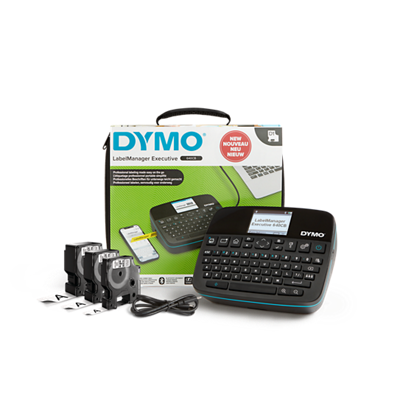
The manufacturer page for item 2202121 lists the device, three standard label cassettes, the rechargeable pack, a USB-C cable and a Quick Start Guide. It does not name cassette widths, colors or finishes. “Three” is helpful only if the labels suit the work you plan to do; before relying on them, inspect each cassette’s D1 size and tape color. Do not assume all three are 24 mm, or that they are all the same width. This is a mixed-use kit decision, not a confirmed three-cassette combination with known materials.
There is a second package uncertainty. Although the title calls this the “Kitcase,” the itemized included-parts list does not name a carrying case. The product image shows the package arrangement, but a picture is not package text. If the case is the reason you are considering this configuration, verify the actual sealed box contents with the seller before purchase. The Box QWY is the clearer choice when one unspecified cassette is acceptable and the case question is irrelevant; the Kitcase is the better candidate only if three unspecified starter cassettes have value to you.
Power and practical limits
The battery pack is rechargeable and included. DYMO’s manual puts a full charge at about three hours, says the unit may be used while charging, and specifies a 5V USB-C wall charger that is not included. The battery has to stay inserted; the USB cable alone does not power the label maker. That makes the package portable, but budget for a suitable charger if you do not already have one. The screen dims after 30 seconds and the machine shuts off after two minutes by default; both details matter when you are using the keyboard between tasks.
DYMO lists the package dimensions as 7.28 × 5.9 × 2.95 inches without identifying which measurement is width, depth or height. Do not use those numbers as a tight cabinet-fit measurement. Tape and adhesive are also part of ownership: the manual says to use D1 cassettes, prepare the surface and avoid extreme heat or sunlight. Even a durable cassette cannot guarantee adhesion on every material.
Who should consider it?
This version suits someone who wants a portable D1 label maker with both on-device typing and an app, and who can make use of several starter cassettes after verifying their sizes. It is less suitable if your media stock is Brother TZe, if USB data printing or a physical lever is essential, or if you need a confirmed hard case in the box. The current U.S. DYMO page marked the listing out of stock at the time checked. Keep the configuration in the comparison because stock can change, but do not read an exact-model search link as evidence that the bundle is presently available.
Compare the exact item list on DYMO’s Kitcase QWY page, the official user guide, and the one-cassette Box review before deciding which package better matches your supply needs.
Key details at a glance
| Full-color output | No |
|---|---|
| Print process | thermal transfer |
| Maximum tape width | 24 mm |
| Compatible cassette | DYMO D1 Standard and Durable cassettes only, widths 6, 9, 12, 19 and 24 mm per the 640 CB guide. D1 is a different cassette family from Brother TZe even where widths overlap. |
| Display type | graphical LCD |
| Maximum lines per label | 5 |
| Line-count note | The manual's line ceiling depends on cassette width: 1 line at 6 mm; 2 at 9 mm; 3 at 12 mm; 4 at 19 mm; and 5 at 24 mm. |
| Saved label files | 30 |
| Computer design route | DYMO Connect for Desktop is listed on the product page; host/cable data workflow remains unconfirmed by the contradictory manual |
| Power choices | A rechargeable Li-ion battery pack is listed as included. The guide says a 5V USB-C wall charger is not included; the machine can be used while charging but requires the battery pack to remain installed. The included cable alone cannot power it. |
| Body dimensions | DYMO lists 7.28 × 5.9 × 2.95 in but does not identify axes; width/depth/height are not assigned for physical-fit matching. |
| What the base package supplies | Exact page for item 2202121 lists three standard label cassettes, rechargeable battery pack, USB-C cable and Quick Start Guide. Cassette sizes/colors are not specified. Although the listing title says Kitcase, the itemized included-parts list does not name a carry case; treat case inclusion as unknown. |
| Letter-key arrangement | qwerty |
| Built-in type styles | 6 |
Use the exact model’s instructions for operating limits, supplied equipment and version differences.
Sources for this assessment
Put the device and its tape system together.
Match the exact model, cassette family, computer or network route and any optional power or touch-panel hardware before buying.