
Your needs, this model
Does it fit your priorities?
Would one-at-a-time Avery address or file labels be useful alongside a continuous tape option?
Brother documents distinct AV2067 address, AV1957 return-address and AV1789 file-folder cassettes for the PT-2610. They print one individually die-cut paper label at a time, rather than a long strip of TZ tape.
Explore this need in the finder →Do you need 24 mm original TZ, rather than 24 mm TZe?
The shared PT-2600/PT-2610 guide confirms 24 mm original TZ. It does not establish 24 mm TZe for this model, despite the conflicting current product specification fields.
Explore this need in the finder →Is the documented USB computer-design route useful even though modern driver support needs a separate check?
The PT-2610 guide documents P-touch Editor and AV Editor over USB 1.1. Its historical operating-system list is old, so current computer compatibility still needs checking.
Explore this need in the finder →Can automatic cutting meet your TZ-tape need, or must the die-cut AV workflow also be auto-cut?
The manual documents automatic cutting and feed/cut for TZ tape, while AV outputs are pre-die-cut labels and its feed function is not documented as an automatic-tape-cut operation.
Explore this need in the finder →Will a 7.7-inch-wide and 2.7-inch-high keyboard machine fit the space you have?
Brother gives the PT-2610 body as 7 2/3 inches wide and 2 2/3 inches high. A 7.7-by-2.7-inch width/height limit fits those documented dimensions; a width below 7 2/3 inches does not.
Explore this need in the finder →A keyboard labeler with a second job: one-at-a-time paper labels
The Brother P-touch PT-2610 is an earlier, discontinued machine for someone who wants both laminated cassette tape and individual die-cut paper mailing or filing labels. Its unusual feature is not a wider version of ordinary tape: it accepts Brother TZ tape and Brother/Avery AV label cassettes as separate media. Switch the cassette, and the job changes from a continuous strip of laminated labels to peel-and-stick address, return-address or file-folder labels. Brother's exact U.S. listing identifies the PT-2610 and lists a carrying case, a black-on-white TZ starter cassette, an AV-2067 cassette with 65 address labels, USB cable, software CD, eight AA batteries and a tape separator in the package. The listing also marks the model discontinued, so this review is mainly useful to an owner, a careful used-machine comparison, or someone checking a machine already in hand—not a signal that a new unit is currently for sale. Brother's PT-2610 page
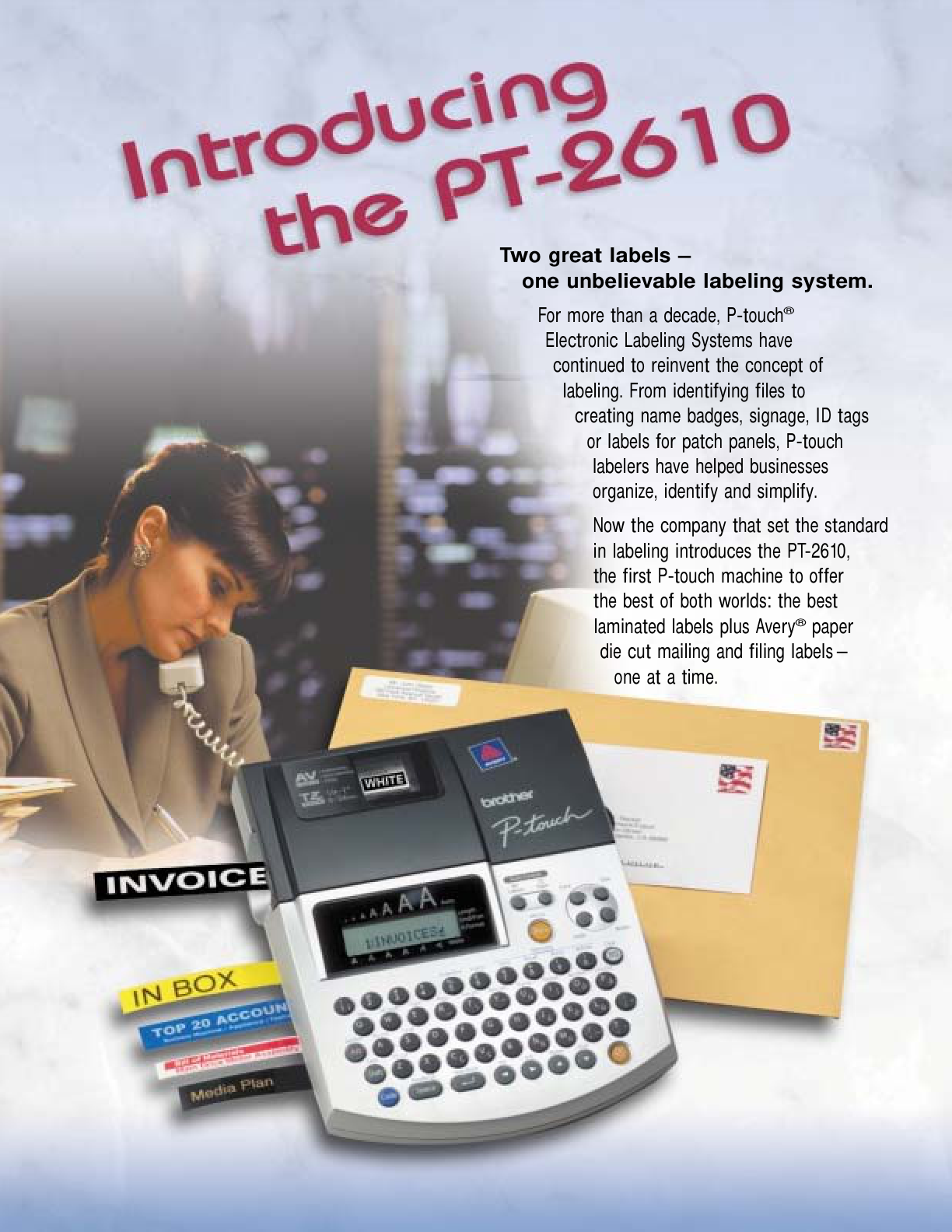
Two media paths, not one generic tape promise
The user guide for the shared PT-2600/PT-2610 platform explicitly says to use Brother TZ tape or Brother/Avery AV labels. For TZ tape it lists five widths, from 6 to 24 mm, and gives the maximum printed lines by tape width: two lines at 6 or 9 mm, three at 12 mm, five at 18 mm and seven at 24 mm. The three AV stocks are a different format: AV2067 address labels, AV1957 return-address labels and AV1789 file-folder labels. Brother describes the AV cassette as printing one label at a time, so it is for mailing and filing—not a substitute for a continuous supply of long tape. The PT-2610's box includes the AV2067 address cassette; the other sizes are separately identified supplies. Brother's PT-2600/PT-2610 User's Guide, version 03
There is a genuine documentation mismatch to keep in view. The current PT2610 product specification table lists TZe widths only through 12 mm and a two-line maximum. The model-specific Brother user guide instead says TZ and AV, and documents wider TZ widths and their line limits. I use the exact guide for this earlier machine's media and operating plans; I do not turn its 24 mm TZ entry into a claim that it accepts 24 mm TZe. If matching a used machine to supplies, check the cartridge code, not just its width or the current online table. The brochure lists some specialty tapes too, but confirm an unusual cassette against its instructions before relying on it.
Local typing or USB design; both depend on old software
The physical 57-key QWERTY keyboard and small 10-character-by-two-line LCD make the PT-2610 usable without a computer for short labels. The display is a review window rather than a comfortable screen for laying out a long address: you enter text, move the cursor to inspect it, then print. The manual describes automatic formats, several text blocks, barcode functions and an automatic cutter for TZ tape. It also describes computer input through USB 1.1, with P-touch Editor and a separate AV Editor for AV paper stock. That second route is useful when an address list, logo or carefully formatted design is easier to compose on a computer than on the device's keypad. The AV Editor includes preset sizes for address, return-address and file-folder labels.
Do not mistake the presence of a USB port for a modern, supported workflow. The bundled software and manual belong to the Windows 98/Me/2000/XP and early Mac OS era; current operating-system and driver compatibility is not established by the documentation inspected here. If computer layout is essential, verify that the exact software and driver can run on the computer you intend to use before relying on the PT-2610. Otherwise, the standalone keyboard path is the simpler choice. It has no documented phone app, Wi-Fi or Bluetooth mode.
Portable with batteries, but still a desk-sized body
Eight AA alkaline batteries and the optional AD-60 adapter are the documented power routes; the listing says the batteries are included and the adapter is not. The manual gives a body size of about 7⅔ by 9½ by 2⅔ inches and a weight of 1.9 pounds without tape or batteries. It can leave the desk, and the PT-2610 package adds a case, but it is a wide tabletop keyboard machine rather than a pocket handheld. For a used unit, inspect the cutter, keyboard, battery compartment, screen and tape-feed path before treating its original supplies as usable. Brother also advises keeping dust off the print head and rollers, and using the specified TZ or AV stock.
Who should compare it—and who should choose another route
The PT-2610 makes the most sense to someone who needs a dedicated keyboard and sometimes wants to print one Avery-style address or file label without feeding a whole sheet through a general printer. It also suits an owner who already has compatible TZ stock and values the extra AV cassette and case. It is a poor fit if you need wireless phone editing, dependable current computer drivers, current TZe interchangeability, a small handheld body or a guaranteed supply of old AV refills. The AV cassettes produce preset die-cut sizes, so they are not free-size labels; TZ tape is the flexible strip option.
For a new purchase, compare the current PT-D610BT if you want an on-device keyboard plus current TZe workflow, or the PT-P710BT if a connected, computer-or-phone-designed desktop machine is more important than direct typing. Neither is an AV paper-label replacement, but both have more relevant current supply and connection documentation. If the paper-label function itself is essential, check the PT-2610's condition and exact AV cassette availability before you choose it; the discontinued model's interesting two-media design is useful only when both the machine and its supplies are actually serviceable.
Key details at a glance
| Full-color output | No |
|---|---|
| Print process | Thermal transfer |
| Maximum tape width | 24 mm |
| Compatible cassette | The version-03 U.S. guide says to use Brother TZ or Brother/Avery AV media. TZ is documented in five widths, 6/9/12/18/24 mm; AV is a separate set of three die-cut paper-label stocks. Brother's current exact-product table lists TZe through 12 mm and a two-line maximum, which conflicts with the older exact-model guide; do not translate legacy 24 mm TZ into TZe compatibility. |
| On-device preview characters | 10 |
| Display type | Monochrome LCD |
| Maximum lines per label | 7 |
| Line-count note | The official PT-2600/PT-2610 User's Guide v03 states width-specific TZ limits and AV-stock limits; Brother's current PT2610 specification table instead says two maximum lines. Keep the conflict visible and do not promise a universal seven-line job without the exact media and design route. |
| Computer design route | ['P-touch Editor 3.2', 'P-touch Quick Editor', 'P-touch AV Editor'] |
| Power choices | The PT-2610 package lists eight AA batteries. The AD-60 is optional and not included. |
| Body dimensions | Brother's U.S. shared guide lists 7 2/3 inches wide by 9 1/2 inches deep by 2 2/3 inches high. |
| Tape cutting | The guide documents TZ tape cutting/feed functions and one-at-a-time AV labels. Its error guidance says not to use the feed function with an AV cassette; the separate AV plan is not treated as automatic-tape-cut capable. |
| What the base package supplies | Brother's exact PT2610 U.S. page and 2002 product brochure list the PT-2610 package with a carry case, black-on-white 12 mm TZ starter tape, AV2067 cassette with 65 address labels, USB cable, software/template/driver CD, eight AA batteries and tape separator. The optional AD-60 is not included. The shared guide says PT-2600 and PT-2610 have the same functions but the PT-2610 package includes a case and additional tape; the PT-2600 remains an individually unresolved directory row and is not adjudicated here. |
| Letter-key arrangement | qwerty |
| Wired Ethernet | No |
| USB host for barcode scanner | No |
| Die-cut Avery AV paper-label cassettes | Yes |
Use the exact model’s instructions for operating limits, supplied equipment and version differences.
Sources for this assessment
- Brother U.S. Office & Home directory row PT2610 at offset 45, ledger index 55
- Brother U.S. exact PT-2610 product page; discontinued status, package, current conflicting specification table
- Brother U.S. PT2610 product-support page, page identifier 2600eus
- Brother U.S. PT-2610 support portal; identifies model as discontinued and provides the exact manuals route
- Brother U.S. official manual index; shared PT-2600/PT-2610 User's Guide v03 dated 2004-02-27
- Brother U.S. official PT-2600/PT-2610 User's Guide, version 03, 250 pages
- Brother exact-model PT-2610 U.S. promotional brochure, © 2002
- Brother U.S. current product recall listing checked for the exact product name; no PT-2610 entry observed
Put the device and its tape system together.
Match the exact model, cassette family, computer or network route and any optional power or touch-panel hardware before buying.