
Your needs, this model
Does it fit your priorities?
Would you rather type short labels on the PT-340’s built-in QWERTY keyboard than compose them on a phone?
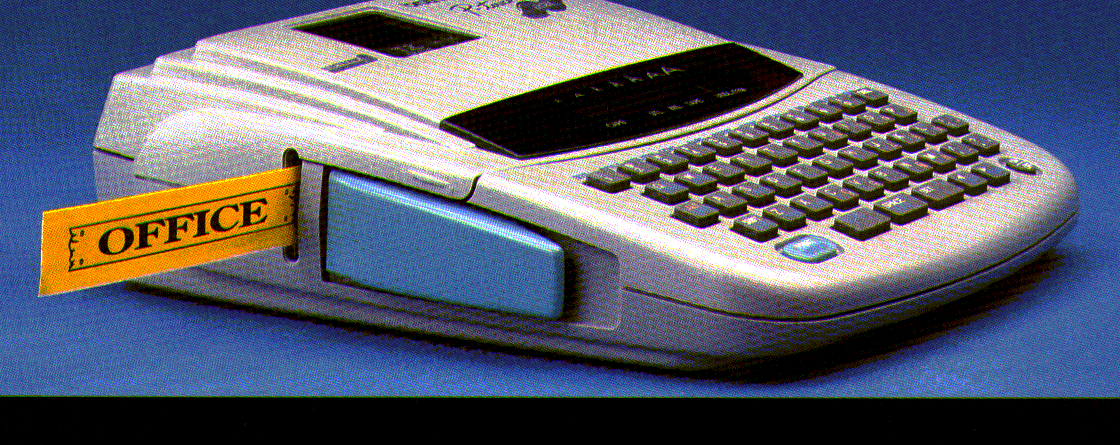
Brother’s exact PT-340 page and product image confirm a physical QWERTY layout; the reviewed sources do not document a phone-app input route.
Explore this need in the finder →Is Brother’s original TZ tape up to 18 mm the cassette system you need?
The PT-340 section of the older guide says to use Brother TZ widths 6, 9, 12 and 18 mm. A 24 mm original-TZ requirement is outside that guide’s range.
Explore this need in the finder →Does Brother-listed TZe through 12 mm suit the existing PT-340, or is 18 mm TZe essential?
The current exact Brother U.S. PT340 listing gives TZe widths of 3.5, 6, 9 and 12 mm. The older 18 mm TZ listing does not establish 18 mm TZe.
Explore this need in the finder →Will you use the PT-340’s cutter lever, or is automatic cutting a must?
The user guide depicts a cutter lever for PT-340. Automatic full cutting is not established.
Explore this need in the finder →Can you use six AA cells or an optional AD-30, or must an AC adapter be included?
The guide identifies six AA cells or optional AD-30 power. The brochure package calls the adapter optional; a used listing’s contents must be checked.
Explore this need in the finder →Will the PT-340 fit the width and height limits for your storage area?
The PT-340 specification gives approximately 6.85 inches width and 2.36 inches height. A smaller width limit excludes it.
Explore this need in the finder →The Brother P-touch PT-340 is an earlier handheld label maker for someone who wants to type at the machine and is comparing a known, used unit rather than a current model. Its physical QWERTY keyboard and small screen keep label making self-contained. Compared with the closely related PT-320, the PT-340 adds a larger bank of formatting choices and symbols; it is still an old manual-cutter machine with a narrow display and a cassette history that needs care.
More ways to dress a label, without a larger editor
The PT-340's 49-key QWERTY keyboard is useful when you would rather enter a short word directly than open a phone or computer. The single-line LCD shows 15 characters at once, so long entries move through a small viewing window; the guide permits two printed lines. That makes short names, shelf labels, file tabs and simple two-line identifiers a natural fit. It is less comfortable for checking a long instruction or laying out a batch from a spreadsheet. The exact sources do not establish a current phone-app or USB-computer design route, so do not buy it for either workflow without separate proof for the particular setup.
Brother's PT-340 brochure lists three ordinary fonts plus five title fonts, eight character sizes, eight type styles, 128 built-in symbols, and ten framing choices. The guide also shows automatic numbering and repeat printing, up to nine copies, with a 300-character phrase memory. Those extras make it more expressive than the PT-320, whose corresponding lists are smaller. They help when making a few decorative name or storage labels; they do not turn the PT-340 into a graphics printer. Color comes from selecting a colored tape backing, not from printing photographs or several ink colors. The one-line screen remains the main limit when proofing a longer design.
Check the cassette family, then the width
Keep the tape evidence source-specific. The PT-340 section of the older shared PT-320/PT-340 user guide says to use Brother TZ cassettes only, at 6, 9, 12 or 18 mm. Brother's current U.S. PT340 record separately lists TZe cassettes at 3.5, 6, 9 and 12 mm, and a current Brother 9 mm TZe supply listing names PT-340 among the compatible machines. Those records document a narrower listed TZe path alongside the older guide's original-TZ path; they do not extend TZe to 18 mm just because the old TZ guide reaches that width. If you are buying for an existing PT-340, check the tape-bay label and cassette code on the unit, then match both the family and width before ordering.
These are laminated adhesive-backed thermal-transfer tapes, not a direct-thermal paper label roll. That is useful for ordinary household and office identification, where a backing and a clear laminate are more practical than a loose paper strip. But the PT-340 is not the right tool for a full-color sticker or arbitrary sheet labels. If you need a specific print height, do not infer it from tape width or from the two-line mode: the reviewed source set does not establish a reliable numeric print-height maximum for matching.
Allow time to cut and power it
The guide shows a physical cutter lever and tells the user to operate it after printing. In a one-off labeling task that is a simple finishing step; across a long run it becomes repetitive. The sources do not document an automatic full-cut mode, so an essential auto-cutter requirement points elsewhere. The machine can run on six AA cells or the optional Brother AD-30 adapter (7 V, 1.2 A). Brother's original U.S. product brochure describes a new-package set with six AAs, a protective case, black-on-clear tape, a tape separator and a lettering stick; it calls the AC adapter optional. That historical package list is not a promise about what will be in a used listing. Confirm the actual sale contents, and inspect the cutter, cassette cover and battery compartment before relying on an older device.
The PT-340 is roughly 6.85 inches wide, 7.87 inches deep and 2.36 inches high, before allowing for room to handle the tape. It is handheld, but not pocket-sized. Its overall shape is close to the PT-320, and the Brother guide lists the same six-AA/optional-adapter approach for that family. If storage fit matters, measure the opening instead of relying on a product photo or rounded brochure dimensions.
Who should still consider it?
Brother marks the PT-340 discontinued. Its best case is an owner who already has a working machine, values on-device QWERTY entry, wants the extra symbol and title-font options, and can identify an appropriate cassette. The format controls and phrase memory can help with occasional reusable wording, while manual cutting and a small one-line screen are reasonable tradeoffs for short labels. It is not a sensible default new purchase when a current connected workflow, automatic cutting, or uncomplicated supply choice is essential.
The PT-320 is the closer comparison if the PT-340's extra formats are not useful; the core keyboard, display and cutter approach is similar. For a fresh standard-TZe setup, compare a current keyboard model such as the PT-D410 instead, and choose based on the exact app, computer and tape needs rather than assuming the old machine's manual range carries over. Brother's PT-340 product page lists the unit as discontinued. The pictured brochure machine is an original PT-340 image, not a present-day package view.
Key details at a glance
| Full-color output | No |
|---|---|
| Print process | thermal transfer |
| Maximum tape width | 12 mm |
| Compatible cassette | Keep source-specific tape paths distinct. The PT-340-specific older guide says original Brother TZ only at 6/9/12/18 mm; Brother’s exact current U.S. PT340 page lists TZe at 3.5/6/9/12 mm, and the exact Brother 9 mm TZe521CS supply page names PT-340 as compatible. The model is separately supported in both documented paths; the old TZ maximum does not make 18 mm TZe. |
| On-device preview characters | 15 |
| Display type | LCD |
| Maximum lines per label | 2 |
| On-device symbols | 128 |
| Power choices | The PT-340 user guide specifies six AA cells or optional AD-30 (7 V, 1.2 A). Brother’s original brochure for a new U.S. package lists six AA batteries and describes the adapter as optional. A used listing may have different contents; included adapter remains unknown. |
| Body dimensions | The PT-340-specific manual specification gives 6.85 × 7.87 × 2.36 inches in width, depth, height order; the U.S. brochure rounds this to 6.9 × 7.9 × 2.4. Leave room for hand use at the tape exit. |
| Tape cutting | The PT-340 overview shows a tape cutter lever; the operating guide instructs the owner to use the lever. Automatic full cutting is not established. |
| Letter-key arrangement | qwerty |
| Built-in type styles | ['normal', 'italic', 'bold', 'italic bold', 'outline', 'italic outline', 'shadow', 'italic shadow'] |
| Original TZ maximum width | 18 mm |
Use the exact model’s instructions for operating limits, supplied equipment and version differences.
Sources for this assessment
- Brother Office & Home catalogue row PT340, offset 165/index 169
- Exact Brother U.S. PT-340 product page
- Exact Brother U.S. PT340 support page
- Brother U.S. PT-340 product-information brochure
- Brother PT-320/PT-340 shared user guide, PT-340-specific sections hosted by ManualsLib
- Exact Brother U.S. TZe521CS supply listing naming PT-340 compatibility
Put the device and its tape system together.
Match the exact model, cassette family, computer or network route and any optional power or touch-panel hardware before buying.