
Your needs, this model
Does it fit your priorities?
Will an earlier standalone TZe handheld fit your on-keyboard routine?
The PT-H105 is an earlier handheld with an onboard keypad and TZe through 12 mm, but Brother’s U.S. page and guide disagree on the key arrangement.
Explore this need in the finder →Would the H105 guide’s Cable Flag format help with a short, manually cut wire label?
The exact guide shows Cable Flag and TZe media; it does not change the 12 mm width ceiling or make tape adhesive suitable for every cable.
Explore this need in the finder →Can you use an optional AC adapter instead of requiring one in the box?
Brother lists AD-24ESA as optional and six AAA cells as the other route; neither an optional adapter nor package contents should be mistaken for an included accessory.
Explore this need in the finder →The Brother P-touch PT-H105 is an older handheld label maker built around on-device typing and Brother TZe cassettes, with a dedicated Cable Flag shortcut and decorative label tools. It is best considered as a discontinued U.S. model for someone who can verify the exact used or remaining-stock unit and wants a portable, self-contained way to make narrow labels. It is not a wide-tape printer or an app-first workflow.
First resolve the identity and keypad question
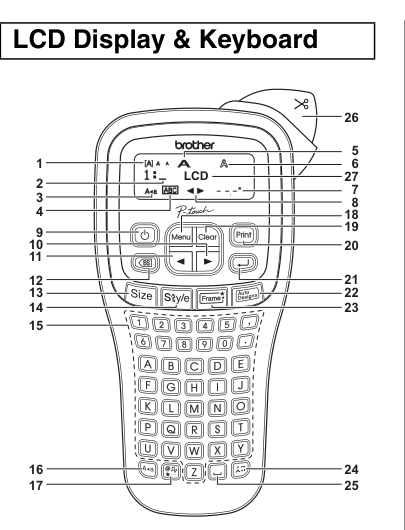
Brother's U.S. product page identifies the model as PT-H105 but its long description calls the machine PT-H100. The exact PT-H105 U.S. User's Guide confirms the H105 identity. There is also a practical contradiction for anyone choosing by key layout: Brother's online feature table says QWERTY, while the drawing in that exact-model guide shows letter keys arranged alphabetically from A through Z. Because the manual illustration and product-page table disagree, I would not buy a PT-H105 on the assumption that its keypad is either QWERTY or alphabetical without checking the actual unit in hand. The separate keyboard-layout matcher therefore does not count this model as a confirmed answer to either essential preference.
That uncertainty matters more than a small spec-sheet advantage. This is a device for entering text at the label maker, using its one-line, 12-character LCD, cursor keys, and hardware formatting buttons. Brother's guide allows up to 80 characters for ordinary text entry, but a long string is not the same thing as a large preview. The preview is generated on the device and Brother warns that it may differ from the printed label. Short names, wire labels, pantry containers, or storage bins are easier to judge here than paragraphs that must remain readable at a glance.
What the H105 can do on its own
The U.S. product page markets the H105 for household projects and electrical or datacom work. It advertises an industrial-symbol library and numeric or alphanumeric serialization; those are manufacturer's feature claims, not a reason to assume barcode scanning, a computer connection, or a batch-management system. The model-specific guide independently documents a Cable Flag mode for folding a label around a wire, plus regular formatting, symbols, saved text files and preset designs. Brother recommends its Flexible ID TZe tape for cable work and points users to the tape's own installation instructions. A cable flag is a convenient layout, not a substitute for checking that a label material suits the cable jacket and environment.
There is a documentation mismatch around storage: the manual describes saving up to nine label files, while the separate U.S. specification table lists 15 standard-memory files. Treat repeat-file capacity as uncertain rather than selecting the machine for a promised number.
TZe tape, line limits, and cutting
The exact U.S. guide says to use Brother TZe cassettes only. Brother lists widths of 3.5, 6, 9 and 12 mm, so the H105 stays in the narrow handheld class. It prints up to two lines, but the guide restricts two-line text to 9 or 12 mm tape; 3.5 and 6 mm are single-line choices. The guide also shows 12 fixed Deco Mode layouts, each for 12 mm cassette tape, with a 200 mm maximum length. Other Auto Designs offer quick arrangements, but the guide cautions that these designs cannot be edited like a free-form layout. If you need wider hierarchy, larger-room signs or desktop batch composition, a TZe desktop model with 18 mm or 24 mm capacity is a more appropriate comparison.
TZe is a cassette family, not just a width. Brother lists specialty versions such as flexible, extra-adhesive, fabric and other tapes, but the surface, cleaning conditions and temperature matter. A laminated face does not promise adhesion to every curved, oily, textured or frequently washed surface. Clean and dry the area, follow the cassette instructions and test one label before making a set. The PT-H105 cuts with a manual lever; it does not give the automatic-cut convenience of larger printers. The guide describes chain printing to reduce excess margins for multiple labels, then asks you to finish the tape at its cut marks. That is manageable for occasional tags, but repetitive short labels take more handling.
Portable, but check the power and box
Brother gives the body as about 4.4 by 8.2 by 2.4 inches and 0.9 lb before batteries and tape. It can travel between rooms, though its long handheld shape still deserves a drawer or pouch measurement. The guide calls for six AAA alkaline or Ni-MH cells; Brother's U.S. specifications list an optional AD-24ESA adapter. Neither a convenient power routine nor a sample cassette should be assumed from a secondhand listing. The U.S. page says the batteries are sold separately, and the original package can be incomplete; confirm the cassette, cutter condition, battery compartment, adapter and any extras with the actual seller. The guide says the machine does not charge rechargeable cells.
Who should keep it on the list?
Choose the PT-H105 only if a standalone keypad, TZe tape through 12 mm, the manual Cable Flag layout, and a portable body solve your actual job—and if you can verify the letter arrangement on the specific unit. Its electrical-label marketing and symbol/serialization claims may appeal to a home workshop, but the conflicting keypad evidence and discontinued status make a product-page comparison alone inadequate. The PT-H110 is the clearer choice when a documented QWERTY keyboard and familiar household routine matter. The PT-H111 is a better starting point when its documented cable-wrap, cable-flag or faceplate shortcuts are the requirement. Both trade some of the H105's specific marketing claims for a more directly documented workflow. For 18 mm labels, automatic cutting or computer design, step up to a TZe desktop machine rather than treating this handheld as a substitute.
Manufacturer references: Brother's U.S. PT-H105 page and the PT-H105 User's Guide v02. These sources disagree on keyboard layout and saved-file count; the physical unit and exact package matter more than a generic page description.
Key details at a glance
| Maximum tape width | 12 mm |
|---|---|
| Compatible cassette | The exact PT-H105 U.S. User's Guide says to use only Brother TZe cassettes; Brother U.S. lists 3.5, 6, 9 and 12 mm widths. It is not a source-confirmed route for TZ, M, Btag or wider media. |
| Built-in templates | 12 |
| On-device preview characters | 12 |
| Display type | LCD, 12 characters × 1 line |
| Maximum lines per label | 2 |
| Line-count note | The exact PT-H105 guide limits two-line text to 9 mm or 12 mm cassettes; 3.5 mm and 6 mm are one-line use. |
| On-device frames | 8 |
| Power choices | The exact U.S. guide calls for six AAA alkaline or Ni-MH cells; Brother U.S. specifications list an optional AD-24ESA adapter. The U.S. product page says AAA batteries are sold separately; the adapter is optional, not included. |
| Body dimensions | Brother U.S. specifications and the exact PT-H105 U.S. guide list approximate W × D × H as 4.4 × 8.2 × 2.4 in and 0.9 lb without batteries or tape cassette. |
| Tape cutting | The exact guide shows a hand-operated tape-cutter lever. Chain Print reduces repeated margins, but the user finishes the strip at the marked cut points. |
| What the base package supplies | Brother’s U.S. product page marks the PT-H105 discontinued and says the AAA cells are sold separately. The archived base-page content does not establish a complete current retail package; inspect the exact used or remaining-stock listing for tape, batteries, adapter and other accessories. |
Use the exact model’s instructions for operating limits, supplied equipment and version differences.
Sources for this assessment
Put the device and its tape system together.
Match the exact model, cassette family, computer or network route and any optional power or touch-panel hardware before buying.