
Your needs, this model
Does it fit your priorities?
Would a compact keypad be more useful than composing on a phone?
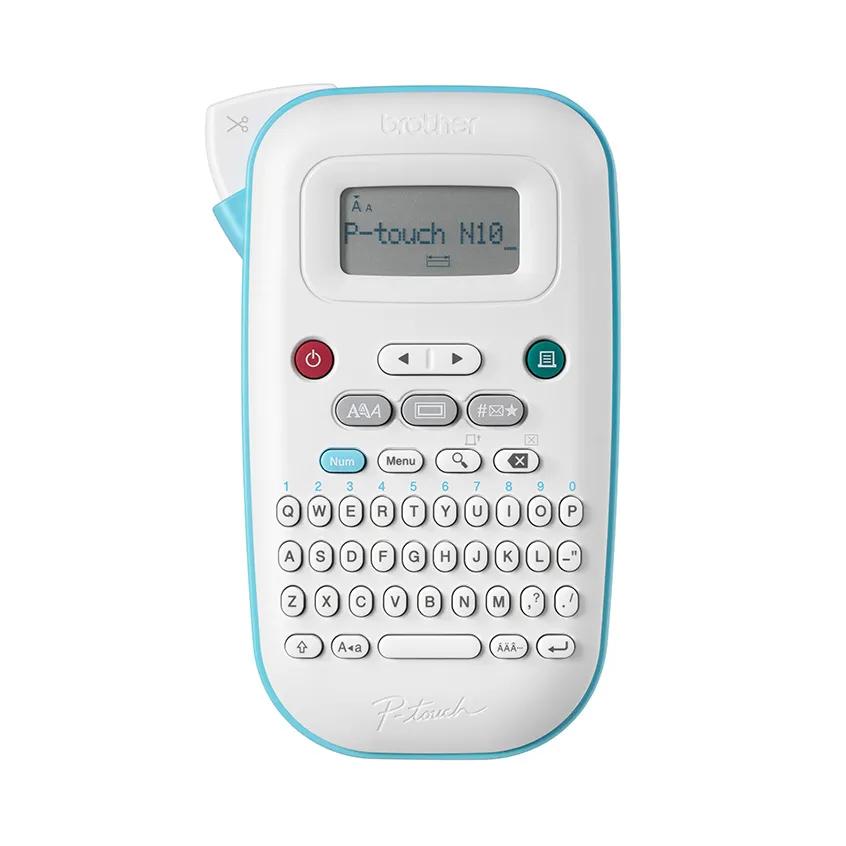
The PT-N10 puts typing, symbol selection and a basic text-and-length preview on the handheld itself. It suits names and short reminders; it does not support Brother's phone app.
Explore this need in the finder →Are two-line labels within a 7 mm print height enough for this job?
Brother lists up to two lines with a combined 7 mm height. If your label needs more vertical print area, compare the PT-N20 or PT-N25BT instead.
Explore this need in the finder →Do you want a battery-powered routine without choosing an adapter?
The PT-N10's listed power route is six AAA alkaline batteries. It saves ten label files, but an AC adapter is not a documented option for this model.
Explore this need in the finder →A narrow, direct-typing format
The PT-N10 is the simplest of these three Btag machines to place beside a calendar, drawer, or craft table: Brother lists a 4.6-inch width and a 7.5-inch depth, with a one-pound weight in its product specifications. The long, narrow body carries a full QWERTY keyboard, a small monochrome display, a tape viewer and a manual cutter. That makes it a real standalone label maker rather than a phone accessory. You can compose a short name, reminder, bin label, or color-coded task without opening an app or pairing a device.
Its distinction is not that it has a dramatically different kind of tape. Like the PT-N20 and PT-N25BT, it accepts Brother's 12 mm Btag cassettes only. The choice is about a more compact body and simpler text-formatting ceiling. This can be the more sensible one if your labels are short and the job is occasional; it is less persuasive if you are already planning longer two-line descriptions or detailed layouts.
What the screen previews—and what it does not
Brother lists a 12-character display and describes the preview as text and label length. The shared manual is more specific: the PT-N10 preview shows text and length, but does not preview font style, size, underline, frames or other styling. That difference matters. If you want to check whether a label is too long, the screen helps. If you need to see how a decorative frame and font combination will look before cutting tape, it is not a full visual proof.
The PT-N10 supports up to two text lines with a combined printed height of 7 mm. Brother lists three fonts, six font styles, ten frames and 200 built-in symbols; it also stores up to ten label files for later recall. These are useful for repeated short labels, not a substitute for a wider or computer-designed sign. For a dense container description or a more visually composed set, the PT-N20 adds a 16-character display that previews an image of the label, 9 mm of maximum print height, 15 frames and 250 built-in symbols. The PT-N25BT retains those larger-body controls and adds a phone-app route.
Btag is a real compatibility boundary
Brother says the PT-N10 is made exclusively for Btag tape. Do not buy it on the assumption that any half-inch tape or another P-touch cassette will fit: 12 mm is the width, but Btag is the named cassette family. Brother presents the family in a range of colors, which gives a useful route to color-coded organizing, yet it also narrows the supplies you must plan around. The related PTN10231BUND offer adds a Btag231 black-on-white 4 m cassette to the PT-N10; the base product page lists a blue-on-white Btag-233 sample. Those are packaging differences, not a different machine.
The manual warns that a label can peel, adhere permanently, change color or transfer depending on its surface and environment. It recommends trying a small piece on an inconspicuous spot and cautions that wet, dirty or uneven surfaces can be difficult. Treat those instructions as more important than broad claims about a label being suitable for everything. For a container, check the exact tape cassette's instructions and the surface before relying on a dishwasher or moisture use.
Plan for batteries, margins and manual cutting
The PT-N10 uses six AAA alkaline batteries, which are not supplied. Brother does not list an optional AC adapter for this model; if the maker will live at a fixed station and wall power matters, compare the PT-N20 or N25BT, whose manual names compatible optional adapters. The cutter is a lever, not an automatic blade. Brother's guide also explains that some tape margin feeds with each label and offers a chain-print option to reduce margins on a sequence, with a manual cut at the end. Very short labels can therefore use more tape than the printed words alone suggest.
For care, follow the manual: avoid pulling tape while it is feeding, keep the cutter lever use within its intended movement, and clean the print head with a soft swab rather than touching it. These are small routines, but they are worth knowing before choosing a cassette system for a recurring labeling project.
Who should consider it
Choose the PT-N10 when hand-held on-device entry, a narrower 4.6-inch body and basic short-label styling matter more than a full screen preview, app design, 9 mm print height or optional adapter power. Compare the PT-N20 if you want the larger screen preview and taller output without smartphone setup. Choose the PT-N25BT if app-created templates and extra symbols are essential. None of these three removes the Btag-only supply constraint, so first decide whether the 12 mm cassette family suits the surfaces and label styles you need.
Key details at a glance
| Maximum tape width | 12 mm |
|---|---|
| Compatible cassette | Brother Btag cassette only; 12 mm (about 1/2 in) tape |
| On-device preview characters | 12 |
| Maximum combined print height | 7 mm |
| Maximum lines per label | 2 |
| On-device frames | 10 |
| On-device symbols | 200 |
| Saved label files | 10 |
| Power choices | Six AAA alkaline batteries; no AC-adapter option is listed for the PT-N10 |
| Body dimensions | 4.6 in wide x 7.5 in deep; the US page lists 2.8 in height while the shared manual lists 2.7 in, so height is unknown for hard-fit matching |
| Tape cutting | Manual tape-cutter lever; allow for the maker's leading and trailing tape margins |
| What the base package supplies | Base listing includes one blue-on-white Btag-233 sample cassette; the related PTN10231BUND package adds a Btag231 black-on-white 12 mm x 4 m cassette |
| Letter-key arrangement | qwerty |
| Built-in type styles | 6 |
Use the exact model’s instructions for operating limits, supplied equipment and version differences.
Sources for this assessment
Put the device and its tape system together.
Match the exact model, cassette family, computer or network route and any optional power or touch-panel hardware before buying.