
Your needs, this model
Does it fit your priorities?
Do you want to check a label image on the maker instead of only reading its text?
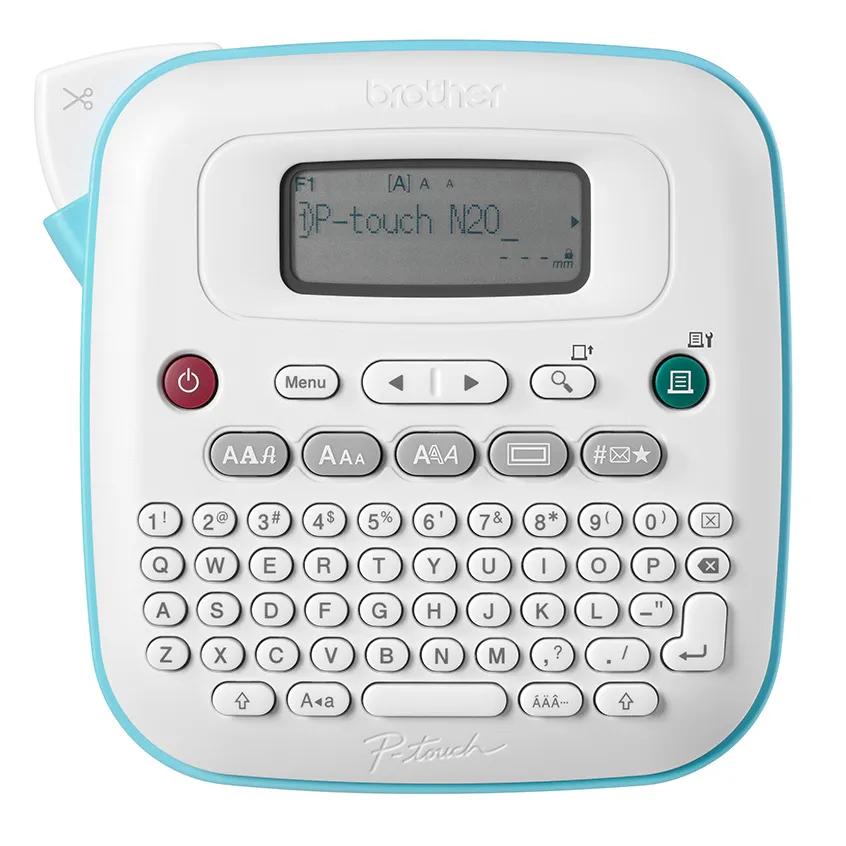
The PT-N20 has the larger 16-character display family, and its preview shows an image of the label and its length. Brother cautions that the printed result can still differ from the display.
Explore this need in the finder →Do you need 9 mm of combined print height and the larger built-in symbol set?
The PT-N20 supports two lines up to 9 mm and lists 250 built-in symbols plus 15 frames, a step up from the smaller PT-N10's documented limits.
Explore this need in the finder →Would an optional AC-adapter route help keep the machine at a fixed station?
The manual lists two optional adapter models for the PT-N20, alongside six AAA batteries. The adapter is not included in the base listing.
Explore this need in the finder →A larger preview without a phone requirement
The PT-N20 is the middle option in Brother's small Btag group, not because it prints to a wider tape—the three machines share the 12 mm Btag cassette system—but because its body and on-device preview have more room. Brother lists a 5.9-by-5.9-inch footprint, a 16-character display and a preview that shows an image of the label and its length. The larger format is more deliberate on a desk than the PT-N10's narrow hand-held shape. If you type and format labels directly on the machine but want a better chance to catch a crowded layout, the N20's screen is a meaningful step up.
It remains a self-contained keyboard model. Brother's specification says there is no mobile printing app for the N20, and the shared guide only documents Design&Print 2 for the PT-N25BT. That keeps the workflow direct: load Btag, type, preview and press the print key. It is a good reason to choose the N20 over the connected model if you do not need an app-created design. It is also the first reason not to choose it if you expect to build labels from a phone.
More room for a two-line label
Brother lists two-line printing to a combined height of 9 mm, compared with 7 mm on the PT-N10. The N20 also has three fonts, seven font styles, 15 frames and 250 built-in symbols; both larger models save up to ten label files. Those are concrete changes for a routine involving repeat tags, short container text or a little more decoration. They do not turn the N20 into a wide-format or full-page printer: the cassette is still about half an inch wide, and the label layout needs to live inside that small tape.
The image preview is better than a text-and-length readout, but it is not a guarantee of the print. Brother's guide says the result can differ from the LCD preview because of screen resolution. The same guide describes unavoidable feed margins and a chain-print option intended to reduce wasted space between labels. If you are making a long run of short labels, learn the chain-print and manual-cut routine first; otherwise tape consumption may be greater than the visible message suggests.
Know the power and media before ordering
The N20 takes six AAA alkaline batteries, which are not included, or one of two optional Brother adapters listed in its manual: AD-24ESA-01 or AD-24ESAW-01. The adapter is a separate purchase, not a feature included by the bare model code. The PT-N20 does not have Bluetooth, Wi-Fi or a documented phone-app route; those absent connection features should not be mistaken for a missing keyboard. The device is designed for direct typing.
Brother specifies Btag as the compatible media family. This is stricter than a generic 12 mm width: tape from another cassette family should not be assumed to work just because its listed width looks right. The base PT-N20 page includes a blue-on-white Btag sample cassette, while the PTN20231BUND package pairs the same printer with a black-on-white Btag231 4 m tape. That bundle affects the colors and amount of tape ready to use; it does not expand the N20's functions. Check the carton listing for the offer you plan to buy, because the machine's model and a retailer's package code are not interchangeable details.
Material fit is separate from print compatibility. Brother's manual cautions that labels can peel, remain permanently fixed, discolor, transfer or fade depending on the area, surface and environment. It recommends a small test on an inconspicuous location and says wet, dirty or uneven surfaces can be difficult. Use the exact cassette directions, especially for containers or areas exposed to moisture, rather than assuming every Btag color has identical use limits.
How it compares with the other two
Consider the PT-N10 if compact width and simple text are more important than the N20's display image and 9 mm output. Consider the PT-N25BT if phone templates, app-added symbols and Bluetooth printing would change your design routine; it still retains the N20's keypad family and print-height ceiling. A phone connection does not add automatic cutting or broader media. The N20 is the cleaner choice when the desired improvement over a basic machine is on-device layout visibility rather than another device in the workflow.
For a home station, craft area or shared workspace that prints occasional small labels, the N20's strongest case is its balance: no app dependency, a more legible preview and more frame and symbol choices than the PT-N10. Its cost is a broader footprint than the N10 and supplies still limited to Btag. Check width, the optional adapter route and the exact kit before choosing it; then compare its detailed PT-N10 and PT-N25BT alternatives against your actual labels.
Key details at a glance
| Maximum tape width | 12 mm |
|---|---|
| Compatible cassette | Brother Btag cassette only; 12 mm (about 1/2 in) tape |
| On-device preview characters | 16 |
| Maximum combined print height | 9 mm |
| Maximum lines per label | 2 |
| On-device frames | 15 |
| On-device symbols | 250 |
| Saved label files | 10 |
| Power choices | Six AAA alkaline batteries or the separately purchased AD-24ESA-01 / AD-24ESAW-01 optional adapter |
| Body dimensions | 5.9 in wide x 5.9 in deep x 2.8 in high |
| Tape cutting | Manual tape-cutter lever; Brother's manual describes smaller-margin chain printing, with a manual cut at the end |
| What the base package supplies | Base listing includes one blue-on-white Btag-233 sample cassette; PTN20231BUND is a separate package with one Btag231 black-on-white 12 mm x 4 m cassette |
| Letter-key arrangement | qwerty |
| Built-in type styles | 7 |
Use the exact model’s instructions for operating limits, supplied equipment and version differences.
Sources for this assessment
Put the device and its tape system together.
Match the exact model, cassette family, computer or network route and any optional power or touch-panel hardware before buying.