
Your needs, this model
Does it fit your priorities?
Will computer-designed layouts over USB work for you, instead of a built-in keyboard?
The exact model has no keyboard or text screen. Brother documents USB computer printing; the included-era apps are P-touch Quick Editor and Editor 3.1. The old computer and software requirements must be checked before relying on this discontinued unit.
Explore this need in the finder →Can your task use original Brother TZ tape through 24 mm, with the manual cutter?
The exact U.S. Quick Reference lists TZ at 6/9/12/18/24 mm and shows a manual cutter. Original TZ is a distinct cassette family; this evidence does not make 36 mm compatible.
Explore this need in the finder →Do you need Brother TZe through 24 mm, rather than a 36 mm TZe cassette?
Brother’s later PT-1500PC-specific FAQ confirms both TZ and TZe can be used, and the exact 1500eus supply list names TZe widths through 24 mm. The current e-commerce table conflicts with a narrower TZe row, so verify the tape-family and width marking on the actual machine; no 36 mm TZe support is documented.
Explore this need in the finder →Is an older, plugged-in USB setup with a hand-cut label acceptable, or is automatic cutting essential?
The PT-1500PC is a USB computer printer powered by an AC adapter and cut with a manual button. It is not a battery-powered, wireless or automatic-cut unit; the original package adapter does not guarantee a used listing still includes it.
Explore this need in the finder →Brother P-touch PT-1500PC review
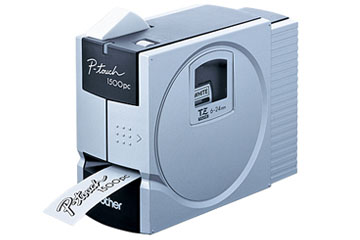
The PT-1500PC is a discontinued, computer-connected desktop label printer for someone who wants to compose a label on a computer rather than type at the machine. Brother's exact U.S. listing marks it discontinued, and its product copy describes USB printing of text, logos, graphics and barcodes on cassette tape. This is therefore best approached as an existing-owner or carefully checked used-unit reference, not as a plug-in accessory that is sure to work with a current laptop.
Computer design is the point—and the dependency
The PT-1500PC has no keyboard or screen for entering and previewing text. Brother's model-specific U.S. specification lists one power/feed key, a status LED and a USB connection. The included software in the Quick Reference is P-touch Quick Editor for short text jobs and P-touch Editor 3.1 for more involved layouts; the product page says those designs can use TrueType fonts, pictures, custom graphics and as many as 13 barcode protocols. Unlike a stand-alone keyboard labeler, the host computer carries almost all the composition work. That is useful for a logo or a prepared computer layout, but a poor fit if you need to type away from the desk, print from a phone, or hand the machine to someone who expects a built-in keypad.
Compatibility is a practical buying constraint, not a footnote. Brother's U.S. support page currently lists Windows 10 (32- and 64-bit) and older Windows versions, and Mac operating systems only through Mac OS X 10.6 and earlier. The Windows download listing shows driver 5.50a and P-touch Editor 4.2.212b, both from 2012; Brother also says it does not update software for operating systems it no longer supports, and the download page says there are no drivers for Windows on ARM processors. A computer link is documented, but the support pages do not establish current Windows 11 or modern macOS compatibility. Before choosing this model, verify the exact computer, driver, cable and application combination you can actually use.
Choose a cassette by its family marking
The U.S. Quick Reference describes the original TZ cassettes at 6, 9, 12, 18 and 24 mm and tells users to use Brother TZ tape. Brother's later U.S. PT-1500PC support-key consumables page also names TZe cassettes for this exact model from 6 through 24 mm, and Brother's TZ/TZe FAQ includes PT-1500PC among models that can use both families. These are two documented cassette routes, not a reason to assume every tape width or label function is interchangeable. The current product page's structured table gives TZe 3.5/6/9/12 mm, while its own description and the older guide describe TZ through 24 mm. The exact specification lists original TZ at 6/9/12/18/24 mm. A later PT-1500PC FAQ confirms both TZ and TZe, and the model-key supplies page lists TZe through 24 mm. That is separate later evidence, while the current product table’s narrower TZe row remains a conflict. The supplies page starts at 6 mm, so I do not count 3.5 mm.
Brother's specifications list 180 dpi, a 10 mm-per-second print speed and maximum print height of 15.8 mm. That print-height figure is not a promise of a particular number of text lines: the product description says the computer layout has no line limit, the structured product table says two lines, and neither the support specification nor the manual establishes one universal line ceiling across widths and software layouts. If a minimum number of lines is essential, do not treat the uncertain table value as confirmation. The exact support specification lists adjustable label lengths from 25 to 306 mm. The machine prints monochrome characters onto the selected tape; it is not a full-color photo printer.
Desktop-only power and manual cutting
The PT-1500PC uses the AD-60 AC adapter and has no battery route. Brother's U.S. Quick Reference lists the adapter and USB cable in the original package, along with a 12 mm TZ starter cassette, software CD and a detachable photo frame. The same guide describes the physical tape-cutter button; Brother's exact specification says the cutter is manual and there is no automatic half-cutter. In a desk workflow, the manual cut is manageable. For runs where automatic separation matters, it is a real limitation. A used listing can be missing original parts even though they were in the original box, so verify the adapter, cable, cassette and frame rather than assuming the photographed bundle is complete.
Brother lists the body at 166 × 67 × 138 mm without the photo frame and 167 × 92 × 141 mm with it, at 540 g. The front-mounted frame can hold a small picture and gives this compact printer a more desk-oriented look, but it is not a carry case or a reason to call the unit portable. The physical constraints are straightforward: keep a power outlet, computer and USB cable close, allow room for the tape exit, and plan to cut each label by hand.
Who should keep it in the comparison?
This model makes sense when a computer-based label layout, 24 mm cassette choices and a known compatible older host solve a specific job. It is less suitable for a new buyer who wants a current app, wireless access, automatic cutting, battery use or dependable support for a modern operating system. Brother's exact product page marks the PT-1500PC discontinued; no current stock, spare-part supply or used-unit condition is assumed here.
For a modern computer-over-USB workflow, compare the Brother PT-P700, which is a different TZe-based design with automatic cutting. If you want a wireless or phone-created route, the PT-P750W offers different connectivity and operating choices. If direct entry at the machine is more important than computer layout, look at a keyboard model such as the PT-D410. The PT-1500PC's useful niche is its old USB computer workflow—not a claim that all Brother tape, software or connection generations behave alike.
Key details at a glance
| Full-color output | No |
|---|---|
| Print process | thermal transfer |
| Maximum tape width | 24 mm |
| Compatible cassette | Use two distinct media paths. The exact 2001 U.S. Quick Reference and exact support specification list original TZ at 6/9/12/18/24 mm. Brother’s later exact PT-1500PC FAQ confirms both TZ and TZe, and the 1500eus-specific consumables catalog lists TZe at 6/9/12/18/24 mm. The current U.S. product-page structured table instead says TZe 3.5/6/9/12 mm; preserve this discrepancy and check the machine’s cassette mark/width. The exact-machine supply listing supports TZe through 24 mm, but no 3.5 mm TZe cassette is counted from that listing. |
| Display type | No text display; one green status LED. The single control is power/feed, not a typing keyboard. |
| Maximum combined print height | 15.8 mm |
| Line-count note | No universal line ceiling is asserted. The product-page narrative says no line limitations while its structured field says two; neither the exact support spec nor manual establishes a universally applicable line maximum. |
| Computer design route | ['P-touch Quick Editor and P-touch Editor Ver. 3.1 on the included CD-ROM per the U.S. Quick Reference. Brother’s later Windows 10 download page lists P-touch Editor4.x 4.2.212b and driver 5.50a, both from 2012.'] |
| Body dimensions | Exact support spec lists 166×67×138 mm (6.5×2.8×5.4 in) without the snap-on photo frame; with frame it is 167×92×141 mm (6.6×3.6×5.6 in). |
| What the base package supplies | The exact U.S. Quick Reference’s unpacking list identifies the AD-60 AC adapter, USB interface cable, 12 mm Brother TZ starter cassette, CD-ROM with P-touch Quick Editor and Editor 3.1, and removable photo frame. This is the original package, not a guarantee of what remains in any used listing. No case is listed. |
| Wired Ethernet | No |
| Original TZ maximum width | 24 mm |
| Carry case in original package | No |
Use the exact model’s instructions for operating limits, supplied equipment and version differences.
Sources for this assessment
- Brother U.S. Office & Home directory, observed PT1500PC row at offset105/index112
- Brother exact U.S. PT1500PC product page
- Brother exact U.S. PT1500PC support page
- Brother exact U.S. PT-1500PC detailed specifications
- Brother exact U.S. PT-1500PC supported operating systems
- Brother PT-1500PC U.S. download overview
- Brother PT-1500PC Windows 10 driver/editor downloads
- Brother exact U.S. PT-1500PC manual index
- Brother PT-1500PC U.S. Quick Reference Guide, version 01
- Brother exact U.S. PT-1500PC TZ/TZe compatibility FAQ
- Brother exact 1500eus U.S. consumables and compatible tape listing
- Brother Japan exact PT-1500PC product page, image provenance only
- Brother Japan exact PT-1500PC product image original bytes
- Brother U.S. product recalls page checked for exact model
Put the device and its tape system together.
Match the exact model, cassette family, computer or network route and any optional power or touch-panel hardware before buying.