
Your needs, this model
Does it fit your priorities?
Would a local QWERTY keyboard and 18 mm TZe matter more than phone editing?
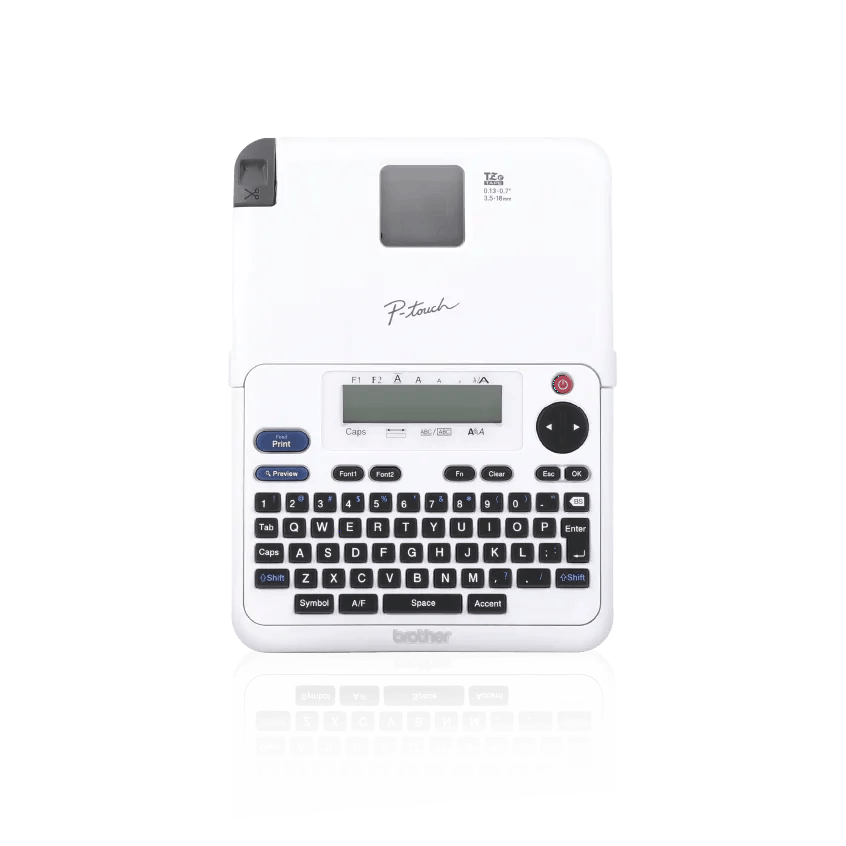
The PT-2040SC is operated from its built-in QWERTY keyboard and supports TZe tape through 18 mm; Brother lists no mobile-device printing app.
Explore this need in the finder →Do you want an included adapter and enough body space for an 8.6-inch-deep desk machine?
Brother lists an AC adapter in the box and gives the PT-2040SC dimensions as about 6.5 × 8.6 × 2.7 inches; six AA batteries are optional and not included.
Explore this need in the finder →Is a computer-connected workflow or automatic cutting essential?
No computer-design route or automatic cutter is documented; the PT-2040 uses local keypad entry and a manually operated cutter lever.
Explore this need in the finder →The Brother PT-2040SC is a keyboard-first TZe label maker for someone who wants a real set of letter keys and tape up to 18 mm wide, but does not need a phone app, wireless printing or computer layout software. Its single-line screen is modest, yet it can store five labels and print two lines on 9, 12 or 18 mm tape. That makes it more versatile than a tiny single-line handheld, while keeping the workflow self-contained: type, preview, print, then move the cutter lever yourself.
Know which label-making job it is built for
This is not a small shipping printer or an app-controlled craft machine. The PT-2040SC has a built-in QWERTY keyboard, a 15-character-by-one-line LCD and an on-device editing path. Brother specifies TZe cassette tape in 3.5, 6, 9, 12 and 18 mm widths. The product page describes laminated labels for indoor and outdoor use, while the manual explains compatible TZe cassettes and notes that surfaces and tape choices matter. It is therefore most at home making names for storage tubs, file folders, pantry containers, workshop drawers and other small household or office items—not long runs of parcel labels or large-format equipment placards.
The small screen shows only one row at a time, but the manual allows up to 80 characters in a label. You can save five label files for repeat jobs. Brother lists two fonts, four sizes, nine styles, 20 frames and more than 90 symbols or pictographs. That is a useful amount of customization for a machine this simple, but the interface still makes you work through the keys and menus. A preview displays text and approximate label length, not the chosen font, size, style, frame or other visual treatment. If accurate on-screen layout review is important, a phone or computer-connected alternative is a better match.
Choose tape width before planning a two-line label
The 18 mm maximum is useful for larger lettering and short stacked descriptions, but it is a cassette width, not a promise of a particular print height. The PT-2040 manual allows two lines only on 9 mm, 12 mm and 18 mm TZe tape. On 3.5 mm or 6 mm tape, the machine rejects a second line. Brother does not give this model a verified printable-height figure in millimeters, so a shopper with a hard minimum print-height requirement should treat that measurement as unknown rather than assume that a two-line label meets it. The width question is easier: 18 mm TZe is documented; 24 mm and wider TZe are not.
Brother describes several TZe tape styles, including laminated, flexible-ID, strong-adhesive, iron-on and tamper-evident options. The cassette must still be the right TZe width and material for the job. A label that survives on a clean container is not automatically suitable for every fabric, cable jacket or high-friction surface; follow the instructions for the particular cassette and test a discreet spot before making a whole set. The machine is monochrome thermal-transfer, not a full-color roll printer.
Power is flexible; cutting is not automatic
The PT-2040SC package includes an AC adapter and two 12 mm sample cassettes: black on white at 8 m and black on clear at 4 m. It can also use six AA alkaline batteries, which are not included. That makes it possible to carry the machine to another room or workbench, although its roughly 6.5-by-8.6-by-2.7-inch body and 1.3-pound weight are larger than the compact handheld models. The long front-to-back dimension matters more than its width if the printer will sit on a shallow shelf.
Printing ends with a manual cutter lever. The manual’s margin choices include full, half, narrow and chain-printing; narrower or chained jobs can reduce waste, but they do not turn it into an automatic batch cutter. In chain printing, the user feeds and cuts after the final label. A full margin can use about an inch of blank tape, so the PT-2040SC is not the best fit when the goal is near-zero leader waste or fast unattended sets. Use the preview, confirm width and text, and keep fingers clear until printing finishes before operating the lever.
PT-2040SC and PT-2040W are separate codes, not a proven feature upgrade
Brother lists both PT2040SC and PT2040W as distinct US catalogue identifiers. Their checked product pages show the same 18 mm TZe ceiling, power choices, one-line screen, customization summary and in-box tapes and adapter; Brother’s US PT-2040 guide covers both names. No functional or package difference is documented on those pages, so the second code is treated here as a covered listing variant of the same operating setup. Do not infer that the “W” means Wi-Fi: the product pages list no mobile-device printing app, and the manual describes standalone entry and printing rather than a wireless design path. Confirm the exact code and package contents in any listing you consider.
Who should choose it instead of a newer connected model?
Choose the PT-2040SC/PT-2040W when a built-in QWERTY keyboard, 18 mm TZe tape and included AC supply are more valuable than connectivity. The PT-D410 is the more capable step up for long or layered labels: it offers computer design by USB, a two-line LCD, broader layout controls and up to five lines on 18 mm TZe, though it is a larger desk machine and still uses a manual cutter. The PT-P300BT is a phone-first alternative if an app matters and 12 mm TZe is wide enough, but it has no built-in keyboard. For 24 mm TZe and richer connected-office flexibility, compare the PT-D610BT.
Questionnaire choices change the fit plainly. Selecting QWERTY, TZe and an 18 mm minimum can keep this model in the running; requiring a phone app, USB computer editing, Wi-Fi, automatic cutting, color output or 24 mm tape rules it out. A strict 9 mm print-height requirement also remains unconfirmed even though two-line printing is supported, because Brother does not publish a matching millimeter figure. That distinction matters: this is a practical standalone organizer, not a connectivity or production label printer.
Key details at a glance
| Full-color output | No |
|---|---|
| Print process | Thermal transfer |
| Maximum tape width | 18 mm |
| Compatible cassette | Brother’s US PT-2040SC/PT-2040W User’s Guide specifies TZe cassettes only, in 3.5, 6, 9, 12 and 18 mm widths. Brother’s exact PT-2040SC page lists supported TZe material types such as laminated, flexible ID, extra-strong adhesive, iron-on fabric, acid-free and tamper-evident. Match the particular cassette to the intended surface; compatibility does not guarantee adhesion in every environment. |
| Built-in templates | 6 |
| On-device preview characters | 15 |
| Display type | One-line monochrome LCD showing 15 characters; the manual says preview displays text and label length, not the selected font, style, size or frame. |
| Maximum lines per label | 2 |
| On-device frames | 20 |
| On-device symbols | 90 |
| Saved label files | 5 |
| Power choices | The PT-2040SC page lists an AC adapter in the box. The shared manual also supports six AA alkaline batteries, not included; Brother says it has no charging feature for rechargeable batteries. |
| Body dimensions | Brother’s US manual specifies approximately 6.5 W × 8.6 D × 2.7 H inches and 1.3 lb without batteries or cassette. |
| Tape cutting | The guide describes full, half, narrow and chain-print margins, followed by manual feeding/cutting. Chain printing can reduce between-label margins but still requires a final feed and lever cut; the manual describes about 1 in (25 mm) feed for the feed function. |
| What the base package supplies | The exact PT2040SC US page lists one 12 mm × 8 m black-on-white TZe cassette, one 12 mm × 4 m black-on-clear TZe cassette, AC adapter and User’s Manual. The PT2040W page lists the same items. No package difference between the two page entries is documented. |
| Letter-key arrangement | qwerty |
| Wired Ethernet | No |
| USB host for barcode scanner | No |
| Optional touch-panel templates | No |
| Optional Bluetooth adapter | No |
| Built-in type styles | 9 |
Use the exact model’s instructions for operating limits, supplied equipment and version differences.
Sources for this assessment
- Brother US PT2040SC exact product page (canonical PT-2040SC listing)
- Brother US PT2040W exact product page
- Brother US PT2040SC product-support route
- Brother US PT-2040 support specification (identifier 2040eus used by PT2040W catalogue row)
- Brother US PT-2040 manuals index: shared PT-2040SC/PT-2040W User’s Guide version 02
- Brother US PT-2040SC/PT-2040W User’s Guide version 02
- Brother Office & Home directory offset 30; PT2040SC and PT2040W observed tiles
- Brother US PT2040SC exact product image bytes (manufacturer render)
- Brother US PT2040W exact product image bytes (manufacturer render)
- Brother US product recalls index checked for PT-2040SC/PT-2040W identifiers
Put the device and its tape system together.
Match the exact model, cassette family, computer or network route and any optional power or touch-panel hardware before buying.